Crossposted from my Google+ account.
Okay, now I'm thinking these must have came out in bulk and I missed the release. Most, or maybe all, are new to me . . .
I especially value ones like Shift+Esc that affect the compose window.
Showing posts with label Gmail. Show all posts
Wednesday, March 20, 2013
MORE Gmail shortcuts!
Labels:
Gmail,
Gmail Tips,
Keyboard Shortcuts,
Tips
Gmail Send keyboard shortcut in new compose interface
Crossposted from my Google+ account.
As many of you know, I venerate and basically worship keyboard shortcuts. Here's one that may be new to you in the "new" Gmail compose interface: Ctrl+Enter to send.
Provecho!
As many of you know, I venerate and basically worship keyboard shortcuts. Here's one that may be new to you in the "new" Gmail compose interface: Ctrl+Enter to send.
Provecho!
Labels:
Gmail,
Gmail Tips,
Keyboard Shortcuts,
Tips
Wednesday, December 5, 2012
An Obvious (Once Learned) Gmail Secret: Quick Quotes
Have you ever wanted to (quickly) quote only a select portion of an email to include with a response in Gmail?
Well, simply select the desired text and then click "reply" or, if you have keyboard shortcuts enabled, press r.
Observe:
Provecho!
Via Gizmodo.
Well, simply select the desired text and then click "reply" or, if you have keyboard shortcuts enabled, press r.
Observe:
![]() |
| It is so choice. |
Via Gizmodo.
Saturday, November 17, 2012
Gmail/Drive/Google Search Field Test: JUST DO IT!
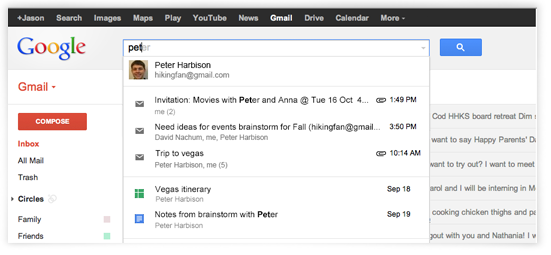
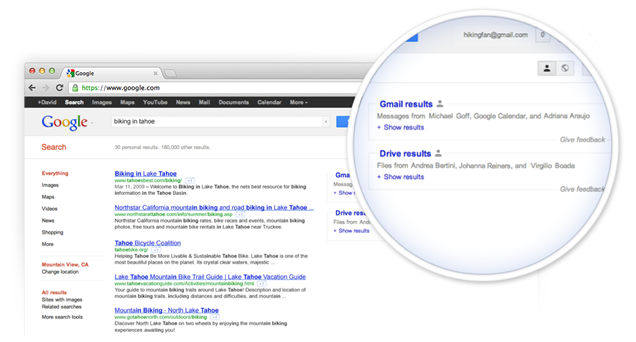
For all you CA readers who love Gmail and Google search, you will love, love, love the Gmail Search Field Trial.
Put simply, the forthcoming search change allows users to seamlessly search for contacts, specific emails, Google+ posts, and files from Drive, all in the beautiful blink of an eye, across Gmail and, at least, Google Search.
Seriously. Go sign up for it. Right now: https://www.google.com/experimental/gmailfieldtrial (You can thank me later.)


Put simply, the forthcoming search change allows users to seamlessly search for contacts, specific emails, Google+ posts, and files from Drive, all in the beautiful blink of an eye, across Gmail and, at least, Google Search.
Seriously. Go sign up for it. Right now: https://www.google.com/experimental/gmailfieldtrial (You can thank me later.)


Labels:
Gmail,
Google,
Google Docs,
Google Drive,
Tech News,
Tips
Wednesday, October 3, 2012
Gmail Update: Search Inside Attachments
Via Google Operating System
If you're like me, you love updates to Gmail and you love Gmail's search capability.
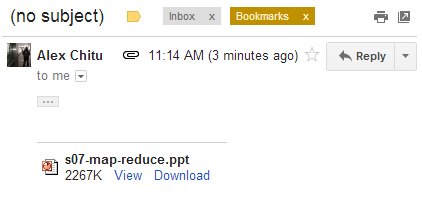
Well, thanks to Alex Chitu over at GOS, I learned Gmail's search powers have been given some awesome sauce: As the title indicates, users can now search inside the text of their attachments.
Witness the two screenshots from Alex, below. The selected email lacks a subject header and any body text, yet Gmail found the text from inside a .ppt file, using the search terms.
You can narrow your search down by using has:attachment and including the file type (pdf, doc, xls, etc.) with filename:[filetype].
Enjoy! Thanks, Alex!!

If you're like me, you love updates to Gmail and you love Gmail's search capability.
Well, thanks to Alex Chitu over at GOS, I learned Gmail's search powers have been given some awesome sauce: As the title indicates, users can now search inside the text of their attachments.
Witness the two screenshots from Alex, below. The selected email lacks a subject header and any body text, yet Gmail found the text from inside a .ppt file, using the search terms.
You can narrow your search down by using has:attachment and including the file type (pdf, doc, xls, etc.) with filename:[filetype].
Enjoy! Thanks, Alex!!

Monday, January 30, 2012
NEWLY UNEARTHED (& UNDOCUMENTED) KEYBOARD SHORTCUT FOR HYPERLINKS IN GMAIL
Well keyboard shortcut lovers, I often grumbled to myself about why Gmail lacked a keyboard shortcut (unlike Docs) for creating a hyperlink.
GRUMBLE NO MORE!
As this lovely keyboard shortcut was new to me, I assumed it was part of the new look Gmail. Take heart, ye traditionalists, ctrl + k works in the "old" Gmail, as well.
May all your hyperlinks be brighter and faster with ctrl + k.
\m/
GRUMBLE NO MORE!
Ctrl + k = create a hyperlink in Gmail
![]() |
| W00t. |
May all your hyperlinks be brighter and faster with ctrl + k.
\m/
Labels:
Gmail,
Keyboard Shortcuts,
Tech News,
Tips
Friday, January 20, 2012
Eating Crow and Liking (er, +1ing) the New Gmail
Gasp! Yes, CA readers, it's true: About last Friday or so, I decided I would take the new Gmail challenge and dive into the new interface. In other words, I decided to use the new look for at least a day or two to decide whether I would really get used to it, as I had heard others report they did.
As a former critic of the new appearance, let me say I now strongly prefer it to the old look. DOUBLE GASP!! Ironically, one of my biggest hangups became, perhaps, my favorite feature: The minimalism.
That's right, kids, the new interface cuts straight to the email. Some complain there's too much white space. I'll tell you what, click on the big gear and select Compact -- that will display plenty of emails. On the other hand, I really like the "Cozy" density and cringe to think of the stress on my eyes, reverting back to compact-style.
And, talking of white space, here's a further irony: Getting rid of many "buttons and knobs" (thank you, Arthur Weasley), I feel more comfortable and focused on my email.
At the end of the day, users still must opt-in to use the new-look Gmail, and this after about two or three months out of the gate . . . I'm unsure what the hold up is. On the other hand, I definitely suggest giving the new look a shot for a couple days and then comparing/contrasting. I definitely think old habits can die hard, especially in Gmail land (see the comments and be warned of some potty mouths). So, take a chance, and if you also decide to make the switch, I hope your diet will be crow free, unlike mine. Provecho!
As a former critic of the new appearance, let me say I now strongly prefer it to the old look. DOUBLE GASP!! Ironically, one of my biggest hangups became, perhaps, my favorite feature: The minimalism.
![]() |
| In the new-look Gmail, t's all about the emails, peepers. |
And, talking of white space, here's a further irony: Getting rid of many "buttons and knobs" (thank you, Arthur Weasley), I feel more comfortable and focused on my email.
In short, when I went back to take a peek at the old Gmail, my eyes felt strained, and I felt stranded in a cluttered garage.
![]() |
| Yes, the old look's more traditional and has less "white space," yet, consider its comparative clutter. |
![]() |
| Ahhh. Now my eyes focus on the email (because, seriously, why would I want to focus on my chat search box, etc.?) |
I'll be candid in saying I feel hesitant about the degree of transparency on some themes, like Turf. Yet, maybe that's just me or, like my conversion experience, simply an initial, gut reaction.
![]() |
| I imagine some might like less turf behind their email. |
Subscribe to:
Posts (Atom)