Showing posts with label Google Docs. Show all posts

Saturday, November 17, 2012

Gmail/Drive/Google Search Field Test: JUST DO IT!

For all you CA readers who love Gmail and Google search, you will love, love, love the Gmail Search Field Trial.

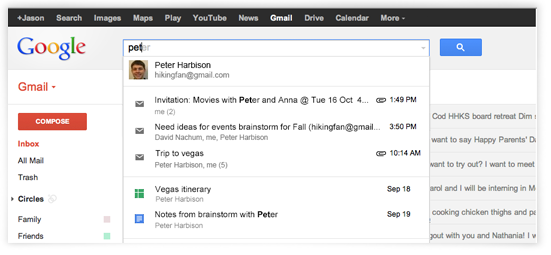
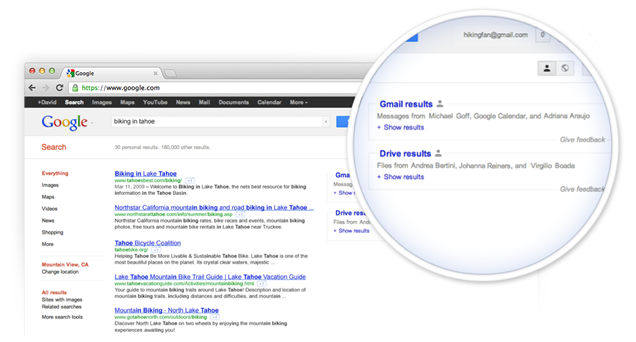
Put simply, the forthcoming search change allows users to seamlessly search for contacts, specific emails, Google+ posts, and files from Drive, all in the beautiful blink of an eye, across Gmail and, at least, Google Search.

Seriously.  Go sign up for it.  Right now:  https://www.google.com/experimental/gmailfieldtrial  (You can thank me later.)


Monday, April 2, 2012

Monday, October 10, 2011

New Feature(s) Coming to Google Docs?

Okay, now that I'm fresh off some conspiracy theory reading from the F-Word, I want to do some hypothesizing of my own:  Something new might be coming to Google Docs, involving Google+.

How do I know, you ask?  Well, have a look.

Docs
Drawings
Spreadsheets
In Docs, Drawings, and Spreadsheets, the notification count and share button are each conspicuously absent.  I checked this across three machines (HP, iMac, and chromebook), three OSes (Windows 7, Snow Leopard, and Chrome OS), three Chrome versions (canary, mac dev, and cros dev), and three separate Google accounts.  All three show the same behavior in docs, at least -- I have yet to check the others on all three and will let any adventuresome reader take up the call.

Is this a bug or something bigger?  I hope the latter.

What do I prognosticate?  In the absence of a bug, I assume this will be something like Google Maps rolled out, where we click on the share button to share the doc, drawing, or spreadsheet we're currently working on with our friends/circles.

What do you think?  Bug, feature, or conspiracy theory?  (I'll leave the Illuminati out of this one; I've already got enough to worry about, now that I know the truth about DIA.)

Monday, August 29, 2011

New Google+ Look (Option) Arrives for Docs

Update:  I believe at least the Docs viewer is (for whatever reason) currently excluded from the new look.

Well, folks, the option for the new Google+ look (or integrated Google, if you prefer) is here.

Just go to a doc, spreadsheet, etc. and select, "Give it a try."

I'll let Alex and others do a complete dissection.  For now, I'm simply glad to see it getting a start.

What do you think about the new look?  Regardless, I think I'll need some time to get used to the loss of color.


Wednesday, August 24, 2011

(Formerly Caps Lock) Search Key on Chromebooks Can Also be Keyboard Shortcut List Trigger?

Okay, this title might look like a lot to take in, so let me set the mood for you:

I'm cozying up, down here in the law school basement, which I just (finally) found out about (in my third year of law school), thanks to a friend of mine, and getting ready to read for Real Estate Transactions.  Yes, please, hold in your excitement.

While I'm looking at the syllabus for the class, I'm surprised to see something -- when I accidentally tap the disabled (for me) new tab/search key (formerly caps lock), the keyboard shortcut list for the docs viewer pops up.  Za? That's right, CA readers, the disabled new tab/search key can also act as a one-key shortcut to pull up at least some Google services' keyboard shortcut list.

Behold:

Who knew a disabled key could accomplish so much?
As I'm feeling the crunch to actually do the readings I set out to do, here in this dank room, filled with centuries old law books, I've tested this theory only in the Docs viewer, the Docs home page, and Google Reader.  The list showed up in the first two and defied me in Google Reader.

So, maybe this is just a Google Docs trick.  Why, just the one, though?  Why any, for that matter?

Anyway, which other Google services can you get this earth-shattering and delightful new trick to work for?  Please let me know.  Happy (hopefully non-law school) reading, to you.
Thursday, August 4, 2011

Chromebooks (finally) get file unzip!

That's right, chromebook, aficionados, the ability to unzip zip files has arrived (experimentally) on chromebooks, with perhaps minus the Acer, at the moment, via the latest dev build 0.14.811.15:  Press ctrl+alt+t (this is called "crosh") and type in experimental_storage enable and press enter.  Voila, I can now unzip files!  Big thanks to William for pointing this out to me:  http://chromeos-cr48.blogspot.com/2011/08/cr-48-dev-channel-update-01481115.html

See the Open archive action button on the right?
Same archive file, unzipped.
I assume this will land on the next stable release, so, in about six weeks (probably a touch longer, since Chrome OS 0.13 is still baking).  I'm really glad to have this obstacle removed.  While I rarely deal with zip files, I absolutely loathe having to do the back and forth of downloading/uploading.

Next, I really hope we'll get the ability to save files from a random site directly to Google Docs and unzip them (rather than just view and open certain files) there -- which seems to me would go nicely with the whole "new thought"/cloud computing concept.

Thursday, July 28, 2011

Scratchpad Gets a Makeover

I was hoping this day would come.  The Chromium team has given scratchpad a makeover.  Now all we need is offline Docs . . .

I'll give you a sprinkling of what I've seen and let the big guns give you the full run down.

Polished interface
I'm impressed with how slick the new interface looks.  Before, with the red, green, and blue dots, I felt like I was jamming on something a 1st grader put together.  Sorry, devs.  Also, the previous version just listed the given notes, while this release gives a date.  Nice.  See the turning throbber icon next to my NEW NOTE?  I was impressed with how fast notes would automatically sync up with my Google Docs.

Old v. New

More Old v. New
I like how the new version gives more formatting options, including font type, size, strikethrough, color, and highlighting.  Looks like the new version lacks a quick delete button . . .  I wonder if people were accidentally deleting their notes?

Scratchpad opened with new Panels flag turned on in dev chanel
I'm less than a huge fan of the new Panels flag, with the Scratchpad app, although I did see a comment or two in the app installation page that sang its praises.  Seemed pretty glitched out, to me.

Oh, three other awesome new features are the ability to search for notes, sort them, and open notes/list in full-tab view.  +1.

Hopefully, I'll avoid anyone hacking my system via this app:  thechromesource.com/chrome-os-hacked-via-scratchpad/

Now if I could just get some keyboard shortcuts (other than ctrl+b for bold, e.g.) . . .