Thursday, August 11, 2011

New Text Completion Tool in Bloger?

While writing another post, I came across what I believe is a new feature in Blogger: Text completion suggestions.

See the blue pencil next to the red dictionary with the Aa on it?
First of all, let me point out that you can show single suggestions or multiple suggestions.  I far prefer the single suggestions, as I seem get really distracted with the multiple suggestions, while the single suggestion almost seems like a convenient spell checker when I'm typing fast -- it can get annoying when it misinterprets my intentions.

How do I accept the suggestions?  Just press the space bar.  I'm unsure how I felt and about this functionality.  I feel a little wrong-footed with it.  On the other hand, I think I might really grow to love it.  What do you think?  Please sound off in the comments below or on my plus post: https://plus.google.com/u/1/110524638589641892271/posts/71FVRTtuRfr

Sunday, August 7, 2011

Today's Spiritual Message: Expressions of Love

Elder Richard G. Scott recently asked the following question:  "Do you tell your wife often how very much you love her? It will bring her great happiness. I’ve heard men tell me when I say that, 'Oh, she knows.' You need to tell her. A woman grows and is greatly blessed by that reassurance. Express gratitude for what your spouse does for you. Express that love and gratitude often. That will make life far richer and more pleasant and purposeful. Don’t withhold those natural expressions of love. And it works a lot better if you are holding her close while you tell her."  The Eternal Blessings of Marriage.

Life for me has, indeed, been far richer, more pleasant, and more purposeful, when I follow this counsel.  How could it bless your life?

Friday, August 5, 2011

Google Dictionary Has Gone the Way of All the Earth (It's Dead)

Update:  Thanks to reader John Hauxwell for reminding me that the Google Dictionary extension still works.  For me personally, I rarely use the click-on-the-book option because I'm huge on keyboard shortcuts and really prefer the full page view, over the extension bubble.  I do love the ctrl+click-on-a-word definition combination.

Boy, I'm an unhappy camper, today.  First, I lamented Print Preview's absence from Chrome OS, and now I mourn the loss of a dear friend:  Google Dictionary.

To die: to sleep; No more.
Whyyyyyyyyyy!!!!????!!!  I suppose Google wants to unify everything and make sure people use google.com for all their searching needs.  Maybe Google's just trying to humble me to the dust, today.
But I got there ahead of you, little Google—I reached a work-around [below] before you could completely alienate me, I understood the truth before you caught up, I fixed the problem with a work-around three hours ago, and the myth, the legend, the Google Dictionary is [still] truly mine!
I hope you Hairless fans out there appreciate that one.  Yes, I believe I have, in fact, found a work-around:

Did Google think I would be scared to violate Google Dictionary's marble tomb?
It's all thanks to a custom search engine I made:  http://www.google.com/search?sourceid=chrome&ie=UTF-8&q=%s#hl=en&prmdo=1&q=%s&tbs=dfn:1&tbo=u&sa=X&ei=fN87TrauE8zC0AG47cWRCQ&sqi=2&ved=0CBgQkQ4&bav=on.2,or.r_gc.r_pw.r_cp.&fp=fdbe5bcf5e3c173e&biw=1600&bih=837  I'm unsure if it will work for everyone.  On the other hand, it's worked for me, every time, today, on a number of different searches.  Let me know if you want help setting it up.

Yes, like Dumbledore, though Google Dictionary's body decays in the white marble tomb in the grounds of Google castle, its power and functionality live on through alternate means.

Rest in peace, Google Dictionary

Print Preview Missing from Chrome OS???

This morning, I'm discouraged and rather hacked off to discuss something I finally realized, to my embarrassment as a proud Cr-48 owner, just yesterday:  Print Preview and its beloved print to pdf functionality are missing, ausento -- no where to be found in Chrome OS . . .

If it's ballyhooed in Chrome 13 stable, where in the world is Print Preview in Chrome OS?
At first, I assumed I was simply overlooking the Print Preview action button, somewhere.  Alas, after doing some research in the Chrome OS bug reports, I'm convinced the functionality is glaringly absent:  http://code.google.com/p/chromium-os/issues/detail?id=16082

On the other hand, from the looks of the same report, there are, thankfully, a number of people requesting (expecting?) this feature.

Another thing I'm confused about is the priority the Chorme OS team (as noted in the bug report, above) has given Print Preview:  "2 - Normal.  Desired for, but does not block, the specified milestone [14] release."  I'm perplexed that the Chrome team proudly declared Print Preview with print to pdf "finally" available in Chrome 13, yet it might miss Chrome OS 14 . . .  The Chrome team declared over 900 "users [from] around the world" (I'm glad this is an international concern) indicated, with stars, their interest in print preview for Chrome.  Maybe Chrome OS will start to get similar numbers, unless this functionality is added soon.

I'm really disappointed.  I definitely enjoy Print Preview and I love print to pdf.  Is this omission a department disconnect or something else?  If the functionality is baked into Chrome, itself, as a trumpeted and much awaited feature, why is it truant from its namesake OS!

Thursday, August 4, 2011

Chromebooks (finally) get file unzip!

That's right, chromebook, aficionados, the ability to unzip zip files has arrived (experimentally) on chromebooks, with perhaps minus the Acer, at the moment, via the latest dev build 0.14.811.15:  Press ctrl+alt+t (this is called "crosh") and type in experimental_storage enable and press enter.  Voila, I can now unzip files!  Big thanks to William for pointing this out to me:  http://chromeos-cr48.blogspot.com/2011/08/cr-48-dev-channel-update-01481115.html

See the Open archive action button on the right?
Same archive file, unzipped.
I assume this will land on the next stable release, so, in about six weeks (probably a touch longer, since Chrome OS 0.13 is still baking).  I'm really glad to have this obstacle removed.  While I rarely deal with zip files, I absolutely loathe having to do the back and forth of downloading/uploading.

Next, I really hope we'll get the ability to save files from a random site directly to Google Docs and unzip them (rather than just view and open certain files) there -- which seems to me would go nicely with the whole "new thought"/cloud computing concept.

Sunday, July 31, 2011

Today's Spiritual Message: Provident Living

The phrase "provident living," or living within our means (not spending more than we have) may sound like a joke to many in the world today, especially after we just went through an economic recession where people could simply "state" how much income they wanted to get a house, and our nation still teeters on the brink of default.

Personally, I'm so grateful that the Lord has called prophets and apostles in our day and age to warn us about avoiding excessive debt.

Here is a link that discuss living within our means and a message from President Thomas S. Monson, which discusses, in part, avoiding excessive debt (given in 2006).

Hope you enjoy both.

Thursday, July 28, 2011

Scratchpad Gets a Makeover

I was hoping this day would come.  The Chromium team has given scratchpad a makeover.  Now all we need is offline Docs . . .

I'll give you a sprinkling of what I've seen and let the big guns give you the full run down.

Polished interface
I'm impressed with how slick the new interface looks.  Before, with the red, green, and blue dots, I felt like I was jamming on something a 1st grader put together.  Sorry, devs.  Also, the previous version just listed the given notes, while this release gives a date.  Nice.  See the turning throbber icon next to my NEW NOTE?  I was impressed with how fast notes would automatically sync up with my Google Docs.

Old v. New

More Old v. New
I like how the new version gives more formatting options, including font type, size, strikethrough, color, and highlighting.  Looks like the new version lacks a quick delete button . . .  I wonder if people were accidentally deleting their notes?

Scratchpad opened with new Panels flag turned on in dev chanel
I'm less than a huge fan of the new Panels flag, with the Scratchpad app, although I did see a comment or two in the app installation page that sang its praises.  Seemed pretty glitched out, to me.

Oh, three other awesome new features are the ability to search for notes, sort them, and open notes/list in full-tab view.  +1.

Hopefully, I'll avoid anyone hacking my system via this app:  thechromesource.com/chrome-os-hacked-via-scratchpad/

Now if I could just get some keyboard shortcuts (other than ctrl+b for bold, e.g.) . . .

Sunday, July 24, 2011

Today's Spiritual Message: I Choose to be Pure

In an age where "anything goes" and, so many "call evil good" (Isaiah 5:20), I'm delighted to see six young people stand up and declare that they can control their sexual appetites and that they are happy because of that decision.

There hath no temptation taken you but such as is common to man: but God is faithful, who will not suffer you to be tempted above that ye are able; but will with the temptation also make a way to escape, that ye may be able to bear it (1 Corinthians 10:13).

Sunday, July 17, 2011

Today's Spiritual Message: T-I-M-E Spells Love

Sometimes I struggle to remember one of the greatest gifts I can give my family is my time.  How often do we like to feel busy and important?  Yet, what could be more important than spending time with our family?  I love what President Dieter F. Uchtdorf said last October General Conference, “In family relationships love is really spelled t-i-m-e, time.”

What do we make our priorities?
"Let’s be honest; it’s rather easy to be busy. We all can think up a list of tasks that will overwhelm our schedules. Some might even think that their self-worth depends on the length of their to-do list. They flood the open spaces in their time with lists of meetings and minutia—even during times of stress and fatigue. Because they unnecessarily complicate their lives, they often feel increased frustration, diminished joy, and too little sense of meaning in their lives."
President Dieter F. Uchtdorf
I invite you to read President Uchtdorf's message, "Of Things That Matter Most," along with a message from this month's Ensign (the official magazine of the Church of Jesus Christ of Latter-day Saints), "T-I-M-E Spells Love."

Friday, July 15, 2011

Google Talk Launch App(?) and New Window Switcher on Chrome OS 14.0.751.0

Update:  Upon further discovery, it turns out the []]] button (next to the full-screen button) has been transformed from a window switcher (alt+tab) to a window maximizer (alt+spacebar+x on Windows).

Okay, as I've said, recently, I usually let these kind of posts go because someone's generally already covered them.  Maybe I've failed to see anything on this one (yet) because it's late on a Friday night . . .  Such is my geekdom.

When I saw on Jee Lee's blog feed that there was finally a new, 14.0 Chrome OS build, I had to try it out and test the waters.

Sure enough, I got what I wanted:  At least two new morsels.

1.  Google Talk Launch App(?)

A Second Google Talk App??
So far as I can tell, all this "new" app does is add another button, with the word "Launch," which does what the previous Talk app already did . . .  Someone want to let me in on the secret?

2.  New Window Switcher Icon and Functionality:  Multiple (Side-Side) Windows with New Keyboard Shortcuts, along with Extended Click for Window Switcher Icon

A new icon, double windows, and more clickable space, oh my!
That's right, folks, the Chrome team appears to have ditched the old window switcher icon in favor of what I consider a more svelte and attractive option.  To be candid, I just figured out it's functionality, so sit down for this one:  When the top-right icon has multiple windows, this means that clicking it will show me my other window(s), behind my current window.  Next, when the icon is solid, clicking it will maximize my current window, covering up the other one.

The Chrome team also (kind of) added some functionality I'd been hankering for, for a long time:  The ability to flick my mouse to the top-right of the screen, click, and have the window change back and forth.  What the Chrome team produced is actually different from what I was expecting -- the new icon switches between maximized and full-screen view, rather than flipping between windows.  I'm confident this new development will really please people who want to see multiple windows at once, and I can always use the alt+tab combo to get between various windows.  Something I'm a little bummed about is that if I want to just maximize a window, rather than making it totally full screen, I think I have to click the window switcher icon, which I dislike because it's a lot more time consuming to target than to simply flick my mouse to the corner or press alt+tab.  So, in other words, if I'm seeing things correctly, there is no keyboard shortcut to maximize a partially opened window.  :(  Ah, well.  I suppose I have a hard time getting everything I want in a new release . . .  ACTUALLY, upon snooping around a little, while Chrome decided if Blogger was going to crash or recover, I discovered a keyboard shortcut to re-size windows:  alt+. and alt+, Going all the way with alt+. is equivalent to maximizing the screen, although slower than one keystroke or single combination.  As I said, it can be hard to get everything we (geeks) want.  I do generally appreciate a friendly work-around, though, so thanks Chrome team.  :)

What else have you guys noticed in the 14.0 build?

P.S.  I seem to have my ctrl+(window switcher icon) screenshots showing up outside my screenshots folder in my File Shelf folder . . .

Tuesday, July 12, 2011

Acer Wifi Chromebook Arrives (Finally)

Well, chromebook aficionados, it looks like Acer's wifi-only chromebook has finally arrived (just under a month after it was scheduled to join the party) and it comes in at $80 less than Samsung's wifi-only model, or a round $350.

Here are the specs of both available chromebooks, from Google.

The Cromia, as it's called, is a tad lighter than the Samsung Series 5 (2.95lbs v. 3.26), has a slightly smaller screen size (11.6" v. 12.1"), runs out of battery about 30% faster (6 hours v. 8.5), and is, some complain, less stylish.  Here is the Cromia on the left, with the Series 5 to the right.

Acer AC700-1099 Chromebook (Wi-Fi)Samsung Series 5 Chromebooks
Moreover, some believe the Series 5 has a better keyboard, which we'll actually find out, after we get some real hands-on reviews.

Finally, I believe the Cromia has a higher screen resolution and supports HDMI output, rather than the Series 5's VGA.

Cromia v. Series 5

My principal questions for comparison would be how much smaller do the screen and keyboard feel, and is there any difference in performance?  If any of these three factors is significantly poorer on the Cromia, I think I'd very well lean toward the Series 5.

Further on performance, the processor/RAM specs are, to my knowledge, identical.

Also, while the Series 5 battery life is notably better, I'm almost always right next to a power outlet, anyway, so that and other features, like a tiny difference in weight and video output, would hardly impact my personal decision.

In the final analysis, maybe the biggest difference between the two is the $80 (or about 18.5%) discount the Cromia offers over the Series 5(?).

What do you think?  Will you buy one over the other, or either one, at all?  Why?

Please sound off in the comments section or chime in on my Google+ post.

I first saw this announcement on Dinu's Chromestory.  Thanks for the news, Dinu!

(Updated at 12:21pm eastern, changing the Cromia weight, based on this eWeek article.)

Sunday, July 10, 2011

Today's Spiritual Message: Watch Your Step

In today's world, so many of us want to justify our actions by saying, "It doesn't hurt anyone else."  I suggest we take a step back and ponder how accurate that defense really is, if ever.


Does any one of us live in a vacuum?  Who can doubt the verity that our actions affect others, our children, future generations, and the world.  Ever heard of the butterfly effect?

Friday, July 8, 2011

Blogger Gets a Facelift!

Just as I'm about to send this news to Alex Chitu and others, I see Alex already knows about it.  Sheesh!

New post editor.
New Interface
I suggest you check out Alex's review for a detailed look.

For now, I mainly really like how clean and newfangled (futuristic) it looks.  I'm sure I'll develop a deeper opinion, soon.  [After writing this, I also learned I can, finally, edit photos in Blogger.  Too bad Picnik's crazy slow (for me, anyway) and lacks a lot of common features that free screenshot tools have, like blur.]

As another tip (I'm in a tipping mood), if you hate having your blog load on your slow machine (hey, my Cr-48's got a pretty cheap processor) and you just want to get straight to a new post, open the New Post link and then bookmark it, and use the bookmark whenever you want to quickly get to a new post, bypassing your full, published blog.

What do you guys think?

How to Ctrl+End on a Chromebook

If you're like me, you live off keyboard shortcuts.  Also, if you're like me, you have a Cr-48 or other chromebook and have been irked that they lack a true way to get to the begging/end of a document, which can normally be done using ctrl+end/home.  The Chrome OS team knows about the issue and is working on it.

File:Google Docs - example document.png
Many of my docs are a lot longer than four words . . .
This morning, I stumbled upon a workaround:  Just press shift and click on the bottom/top of the scroll bar.

That's it!  I hope this tip helps those of you (if any?) who have been agonizing over this on your chromebook.

Wednesday, July 6, 2011

Chrome OS Stable on Cr-48 Has Arrived(?)

FINAL UPDATE;  Okay, I tried the stable build for like five minutes, yesterday, got annoyed with how slow Pandora made my Cr-48, coupled with the fact that both Chrome OS flash plugins failed to work with Google Music (ironic, for the stable build?), and I disliked how slow the build felt, in general.  Maybe these are some of the reasons why the 12.0.433.231 "stable" build is missing from cros-omahaproxy.appspot.com/.

Update:  After downloading a new Chrome OS recovery image, and according to my chrome://settings/about page, I am indeed on the stable channel.

See where it says "stable-channel x86-Mario"
Funny thing is, I'm failing to see the build listed on the http://cros-omahaproxy.appspot.com/ page.

I see a Samsung (Alex) stable channel, but where's the Mario (Cr-48) stable channel listing?
I'm curious to see how this turns out . . .

I mainly want to see if Chrome OS stability = increased speed/performance (while unstable Chrome OS = slow).  We'll see.  [Original post follows.]

Well, I'm confused on this one, folks.

Supposedly, a stable channel release of Chrome OS on the Cr-48 has been released.  From my experience (see my comment at Jay Lee's blog), it may be available only as a system restore image . . .

I'll try again, tomorrow.

Any thoughts?

Want a Google+ Invite? Let Me Know

FINAL UPDATE:  And they're gone again . . .  Rather than go through this update process every time, if you'd like an invite, please let me know, and I'll send you one, when I have the ability.  Thanks.

2d Update:  Looks like invites are back on.  We'll see how long it lasts.  Let me know if you'd like one.

Update:  The moment I went to start sending out invites, this image disappeared . . .  Either Google's really clamping down on the number of invites it gives out, or Google+ demand is as impressive as some believe.  To be candid, I'm more inclined to believe the former.  When will + be open to one and all?  (I've seen some speculation that it will happen by the end of the month.)
Taken from my + account . . .

Sunday, July 3, 2011

Today's Spiritual Message: And This Be Our Motto: "In God Is Our Trust"

Have you ever sang the second and fourth verses of The Star Spangled Banner?  I had that privilege at church, today, and really got choked up:
File:Flag of the United States (Pantone).svg
In God is our trust.

On the shore, dimly seen through the mists of the deep,
Where the foe's haughty host in dread silence reposes,
What is that which the breeze, o'er the towering steep,
As it fitfully blows, half conceals, half discloses?
Now it catches the gleam of the morning's first beam,
In full glory reflected now shines in the stream:
'Tis the star-spangled banner! Oh long may it wave
O'er the land of the free and the home of the brave!
File:Flag funeral.jpg
To me, this photo says it all.

Oh! thus be it ever, when freemen shall stand
Between their loved home and the war's desolation!
Blest with victory and peace, may the heav'n rescued land
Praise the Power that hath made and preserved us a nation.
Then conquer we must, when our cause it is just,
And this be our motto: "In God is our trust."
And the star-spangled banner in triumph shall wave
O'er the land of the free and the home of the brave!

I'm really touched by the second verse's reference to the sacrifice and suffering of our heroes of war who gave their life to gain and protect our freedom.  I know a number of brave men who have served our country in war and were also willing to give their lives.  I honor them.

I'm also moved to think back to a time when the whole nation stood up together and "Praise[d] the Power that hath made and preserved us a nation."  How I wish we would have that same reverence and veneration, today!
Behold, this is a choice land, and whatsoever nation shall possess it shall be free from bondage, and from captivity, and from all other nations under heaven, if they will but serve the God of the land, who is Jesus Christ, who hath been manifested by the things which we have written.
Ether 12: 2.  I hope and pray that we will, as a nation, return to praising the Power that hath made and preserved us a nation.

File:MayflowerHarbor.jpg
Many of our forebears crossed the Atlantic in an outright
trust and general dependence on God.  How much can
the same be said about this nation, today?
While the storm clouds gather far across the sea,
Let us swear allegiance to a land that's free,
Let us all be grateful for a land so fair,
As we raise our voices in a solemn prayer.
God bless America,
Land that I love.
Stand beside her, and guide her
Through the night with a light from above.
From the mountains, to the prairies,
To the oceans, white with foam
God bless America, My home sweet home
God bless America, My home sweet home.
Friday, July 1, 2011

A Couple Chrome Tips: Open Multiple Bookmarks and Select Multiple Tabs

First of all, I imagine someone like Alex, Dinu, Daniel, or Nigel has already posted on these tips.  With that said, the other day, while I was reading my morning scriptures, I came across a few tricks I had either forgotten, never realized, or simply never read about:

Open multiple bookmarks.  Just about every morning, I have three pages I want to open up, and I can get annoyed with having to find the URLs or even with clicking on them in my most visited section.  For some reason, I had it finally click in for me that I could simply bookmark the three pages and then, perhaps, open them all at once.  It's possible.  Here's how.

I'd show you the right-click action with its accompanying menu . . . alas, Chrome OS forbids me.  Nooooo!! the naysayers were right, it can't do everything!!!
1. First of all, save your three bookmarks (or however many) into one folder.
2. Next, either place that folder on the bookmarks bar or find it via the "Other bookmarks" folder.
3. Finally, right click the folder and then choose whether to open all of them in the current window, a new window, or an incognito window.

For some reason, opening the bookmarks in the same window leaves the current tab in its current state, in addition to the newly minted tabs.  E.g., if I open the three bookmarks from my specified folder from the new tab page, I'll now have four tabs:  My three bookmarks, along with the new tab page (still open).  I suppose it is a struggle to try and win 'em all . . .

Select multiple tabs.  I'm unsure why I thought to try this one.  Sometimes, you might want to close/move/etc. multiple tabs that are not adjacent to one another.  Well, we can achieve this dearest wish of our heart by simply pressing the ctrl key, while clicking on the targeted tabs.  That's it.  Now we can move them wherever we want (within boundaries, of course, people, be reasonable), close them, pin them, etc.  Pretty straightforward.

Can you see how the three top-right tabs are selected?
As the emperor in Amadeus would say, "Well, there i'tis."  Translation:  That's it.

"And now," as Dumbledore would likely declare, "it really is time for bed."


Wednesday, June 22, 2011

HAPPY 450th POST!!! Picasa Icon Viewing Tip

Yes, CA faithful, it's time for a long-lost computing tip from the CA.

Screen shot 2011-06-22 at 10.35.31 PM.png

Do you use Picasa as your default picture viewer?  Well, I do.  This has nice little benefits like a fun slideshow effect, when viewing images from my file folder.  What's the downside I've grumbled to myself about for the past few years?  Image icons are displayed as a flippin brown hill with trees on it!!

Seriously, what's with the hill/trees graphic (rather than an actual preview of the images)?
Finally, the other day, I put my grumbling to rest and got out my search hat.  Ironically enough, I found the answer in about 10 seconds.

So here's the low down on how to fix this annoyance on a Windows machine:

Open your folder window and click on Tools>Folder options (as shown below)


Next, click on the view tab, as follows:  View>Always show icons, never thumbnails


You'll want to make sure the "Always show icons, never thumbnails box is unchecked (as shown below)


Finally, choose your image size (small, medium, large, JUMBO-large, etc.):


I recommend large or extra large, especially if the folder is a pictures folder (you can always change the display size, whenever you want)


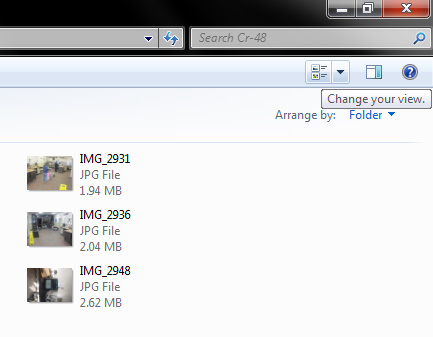
VOILA!!  Now, I can finally see what picture "IMG_2948" actually is, absent opening it up in Picasa.

Ah, now visible memories.
For those of you who ever upload screenshots (or, frankly, any pictures at all), I imagine you'll really enjoy this change, if you're a Picasa user who's been agonizing over this wonkiness.

Please hit me with any questions or comments in the, well, comments section.