Friday, September 16, 2011

New in Blogger: Post Albums

Hats off to my wife for pointing this one out to me:  Yes, F-Word, now that the wife has beaten me to a tech news scoop, I have (once more) relinquished my man card.

So, here's the story.  My wife's basking in the warmth of some pictures from one of her recent, private posts, only to realize there're some kind of Google+-like thumbnails at the bottom of the screen . . .  After some investigation, I've concluded each Blogger post now has it's own album of post-specific photos.  Observe:

Blogger post albums:  Who knew, right?
An added bonus (in addition to the album-style rendering, I mean) seems to be that I can now access post pictures, absent having to open up/reload a new tab.  Nice.

How much does or will this have to do with Google+ integration, as I originally assumed?

Thursday, September 15, 2011

Busy-ness

This morning, I'd like to share some thoughts from my reading in the Book of Mormon.

In 1 Nephi 17:45, Nephi chastises his brethren because of their wickedness and accompanying insensitivity to spiritual things.

The late Elder Joseph B. Wirtlin observed, "This is a noisy and busy world that we live in. Remember that being busy is not necessarily being spiritual. If we are not careful, the things of this world can crowd out the things of the Spirit."  Book of Mormon Study Manual, page 39 or The Unspeakable Gift, April 2003 General Conference.

Dieter F. Uchtdorf echoed this sentiment and recently remarked,
Let’s be honest; it’s rather easy to be busy. We all can think up a list of tasks that will overwhelm our schedules. Some might even think that their self-worth depends on the length of their to-do list. They flood the open spaces in their time with lists of meetings and minutia—even during times of stress and fatigue. Because they unnecessarily complicate their lives, they often feel increased frustration, diminished joy, and too little sense of meaning in their lives.
It is said that any virtue when taken to an extreme can become a vice. Overscheduling our days would certainly qualify for this. There comes a point where milestones can become millstones and ambitions, albatrosses around our necks.
Of Things That Matter Most, April 2011 General Conference.

I recognize I often fall pray to this syndrome, myself, and I invite us all to take some time for quiet reflection, communing with God, and focusing on the things that matter most, especially our family.

Sunday, September 11, 2011

Today's Spiritual Message: In Memoriam, 9/11

Today, my heart is full of pondering, of remembering that fateful day, from ten years ago.  I will always remember watching the events of 9/11 unfold, from the remote TV in my physics classroom, in high school.  I'm so grateful for those who gave their lives to save and rescue others.

Remembering those who gave their lives.
Tom Brokaw and the Mormon Tabernacle Choir will air a special 9/11 broadcast, today.
In remembering 9/11, I invite you to watch a special memorial broadcast, recorded by Tom Brokaw, who was a news anchor detailing the events of 9/11, and the Mormon Tabernacle Choir, who quickly performed a memorial service.  The broadcast will be aired throughout the day.

Finally, invite you to read two different articles reflecting on 9/11, one by Thomas S. Monson, President of the Church of Jesus Christ of Latter-day Saints (in the Washington Post) and the other by Emory Cook, of BYUtv.

May we be a better people as a result of the 9/11 tragedy -- more full of love and compassion, and may God bless America.

Saturday, September 10, 2011

"Web Worker" Extension/App/Process(?) in Chrome OS

This morning, I discovered another a little something that's at least new to me in Chrome OS:

Extension, app, process, plugin?  What is Web Worker?
I believe Web Worker has something to do with Google Docs because it seems to have disappeared after I closed out the two docs tabs ("apps") shown, above, and then reappeared, after reopening one.

I did a brief bit of research and came up with . . . nothing.  So, guys, what's this Web Worker instance in my task manager?  Please sound off below or on my Google+ post.

Friday, September 9, 2011

A Potpourri of Updates in Chrome OS 0.15.1011.0

Chrome OS dev 0.15.1011.0 landed, tonight, and I'd like to share a few observations:

File manager gets, well, a file cabinet icon (rather than the empty box logo)
The bookmark manager now has (or has had, and I'm just  finally noticing it) a link in the
Bookmarks section of the New Tab page
Extensions are now included in and redirected to the settings page, with a fun makeover, recently sighted by Dinu
Correction:  Wrench>Tools>Extensions navigates to the old page, rather than this one -- I assume this will change
Synced tabs and search engines are almost here!
(Well, technically, they are here, as flags)
Lazy Background Pages -- some extensions can be prevented from running until they are called upon -- cool
Update:  I tried this out and it seems to disable LastPass and possibly other extensions, too:
you might want to wait for this one
What else have you guys noticed?  Thoughts/comments?  Again, I also want someone to tell me what happened to multiple profiles, as a flag . . .

OH, I almost forgot to mention the boot up screen now has a Chrome-y animation and white background.  Okay(?).

Sunday, September 4, 2011

Today's Spiritual Message: The Sting of the Scorpion

Our actions all have consequences.  Some of them really sting.


The Savior Jesus Christ reaches out to all of us who have felt the stinging consequences of sin, pleading, "[W]ill ye not now return unto me, and repent of your sins, and be converted, that I may heal you?"

Click here to read more of the message behind the video.

Thursday, September 1, 2011

Print Preview Lands in Chrome OS (Sort Of)

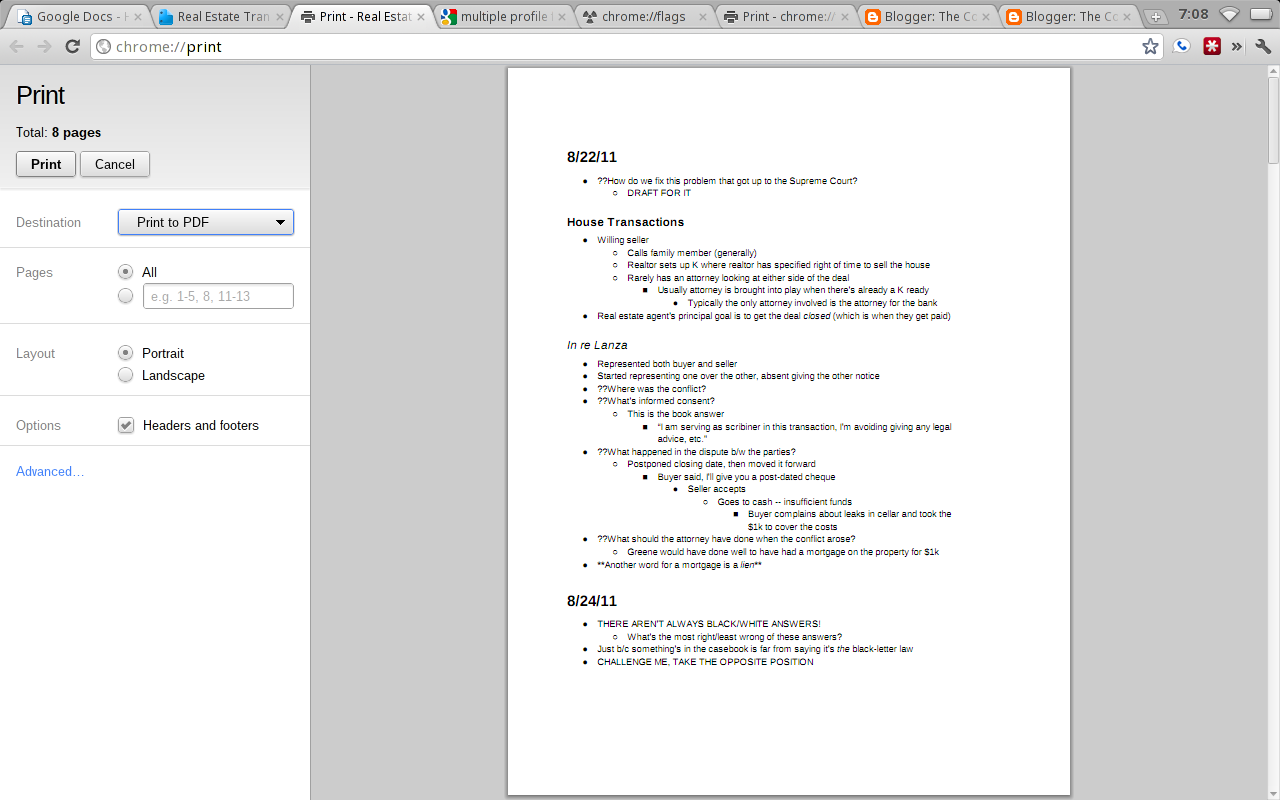
You may recall how, a few weeks ago, I lamented Chrome OS's lack of print preview.  Print preview fans, strap on your seat belts because print preview has landed in Chrome OS . . . as a flag.  In case this term sounds new, go to about:flags or chrome://flags, to see the myriad EXPERIMENTAL features for chrome/chrome os there.  Frankly, I strongly suggest you avoid enabling a flag unless you're determined to have it (as I am with click-to-play and print preview).  With that caveat, behold the screenshots:

Is the add/remove URL headers/footers new to print preview, or just new to me?
Who knew my Real Estate Transactions notes could look so good?
Ah, spreadsheet print preview!
So, there you have it.  In my very brief tests, I ran into only one page that failed to load a preview correctly, and I was able to do a refresh, and it worked fine.  While I'm sure there will be plenty of hiccups, here and there, you may want to give the print preview flag some love, especially if you love print preview like I do.

By the way, the whole reason I blundered upon this flag, in the first place, was because I was searching for a multiple profiles trigger.  Renji, or anyone else, how can I set up multiple profiles on Chrome OS, inside one account, like I can on a dev/canary Windows build of Chrome?

Thanks for reading, and happy previewing!

Tuesday, August 30, 2011

Omnibox History Sync Now Available in Chrome

P.S. I forgot to mention Dinu spotted this in Chromium, back in May: http://chromestory.com/2011/05/google-chrome-to-sync-typed-urls-and-browsing-sessions-now-in-chromium/

Omnibox History Sync, now available
Well, folks, the picture and caption say it all.  I updated my Cr-48 this morning to 0.15.950.0 and saw a message on the new tab page, telling me omnibox history sync is now enabled.  Hurray!

Now all I need is for Alex, Dinu, or someone else to explain or find out exactly what this means.  :)

Monday, August 29, 2011

New Google+ Look (Option) Arrives for Docs

Update:  I believe at least the Docs viewer is (for whatever reason) currently excluded from the new look.

Well, folks, the option for the new Google+ look (or integrated Google, if you prefer) is here.

Just go to a doc, spreadsheet, etc. and select, "Give it a try."

I'll let Alex and others do a complete dissection.  For now, I'm simply glad to see it getting a start.

What do you think about the new look?  Regardless, I think I'll need some time to get used to the loss of color.


Does Google Calendar Now Gray Out Old Events?

Update:  Thanks to a comment from reader Renji, I have learned this is, in fact, a setting in Google Calendar, called "Event Dimming," located in the settings page.  Glad to know I have some shreds of eyesight and sanity left.  Now, I'd like someone to clue me in on when this feature started (or, if it was months ago, let's just forget I asked).

Looking at my calendar, this morning, I believe Google Calendar has started to gray out old events, making it easier to focus on today's appointments.  Is this new and intentional, is it old, or am I just seeing things?  (You are instructed to disregard the red line in the first image.)


By the way, while I like Aviary's suite of tools, I get really annoyed with it's "user-friendliness" . . .

Sunday, August 28, 2011

Today's Spiritual Message: Reversing Our Moral Decay

The other day, I read an opinion piece in the Wall Street Journal by Rabbi Lord Sacks, the chief rabbi of the United Hebrew Congregations of the Commonwealth (in the United Kingdom).

Many have blamed moral decay for the recent riots in the UK
Rather than summarize the entire article for you, I will excerpt a few points and strongly urge you to read the rest:  In the recent British riots, of those charged with crimes,
60% had a previous criminal record, and 25% belonged to gangs.
This was the bursting of a dam of potential trouble that has been building for years. The collapse of families and communities leaves in its wake unsocialized young people, deprived of parental care, who on average—and yes, there are exceptions—do worse than their peers at school, are more susceptible to drug and alcohol abuse, less likely to find stable employment and more likely to land up in jail.
The truth is, it is not their fault. They are the victims of the tsunami of wishful thinking that washed across the West saying that you can have sex without the responsibility of marriage, children without the responsibility of parenthood, social order without the responsibility of citizenship, liberty without the responsibility of morality and self-esteem without the responsibility of work and earned achievement.
Indeed, I'm unsure whether many would agree there even is an objective morality, anymore.  On the other hand, there used to be.  Consider, for example, the words of President Thomas S. Monson, 84:
We have come to the earth in troubled times. The moral compass of the masses has gradually shifted to an “almost anything goes” position.
I’ve lived long enough to have witnessed much of the metamorphosis of society’s morals. Where once the standards of the Church and the standards of society were mostly compatible, now there is a wide chasm between us, and it’s growing ever wider.  (Priesthood Power, April 2011 General Conference.)
So what is the solution to this moral decay and ever widening chasm?  According to Lord Sacks, a return to religion.  According to British Prime Minister David Cameron, and as I understand it, a return to families.

The family must be the focus of our efforts to reverse moral decay
I am in favor of both solutions, with particular emphasis on the family.  In 1995, the First Presidency and Quorum of the Twelve Apostles of the Church of Jesus Christ of Latter-day Saints made a prophetic statement on the family, which reads, in part:
Further, we warn that the disintegration of the family will bring upon individuals, communities, and nations the calamities foretold by ancient and modern prophets.
WE CALL UPON responsible citizens and officers of government everywhere to promote those measures designed to maintain and strengthen the family as the fundamental unit of society.  (The Family:  A Proclamation to the World.)
So, what can you and I do to reverse moral decay, in promoting the family as the fundamental unit of society?  We can vote, we can write letters to the editor, we can blog, we can tweet, we can email, we can shut off the vulgarity and violence found on TV, the Internet, and countless movies.  We can stand up and say, "enough is enough, and this is where I draw a moral line in the sand that I refuse to cross."

In closing, I love this quote, shared by President Dieter F. Uchtdorf and attributed to Saint Francis of Assisi, “Preach the gospel at all times and if necessary, use words."  (Waiting on the Road to Damascus, April 2011 General Conference.)

What else are God's prophets and apostles teaching about the family and other important topics, today?  "Come and see."  (reference to John 1:45-46.)

Thursday, August 25, 2011

Automatic Sign-in for Google Sites in Chrome 15

Update:  I want to tip my hat to Dinu of ChromeStory, for spotting a glimpse of this in the Chromium code, back in June:  http://chromestory.com/2011/06/using-chrome-sync-you-are-already-logged-in-to-google-account/

Over the past couple days, I've stumbled across what I believe is a new feature in Chrome 15:  Enable automatic sign in for Google sites.


The functionality is a little less automatic than advertised, as it appears the feature allows me to manually click on "Sign in," which will enable me to avoid typing in my username/password.


Neato for people who want to avoid using LastPass.  For me, I prefer the full automation LastPass provides (I land on a site and LastPass fills in my credentials and logs me in).

Wednesday, August 24, 2011

Obama Calls Bush Unpatriotic for $4T Spending -- Then Does the Same in 33% of the Time

How meaningfully delicious are campaign hope and change?  Take a look:


Oh, and guess when our very own President Obama called lonesome, "#43," unpatriotic for spending too much?  July 3, 2008.  Hmm.  That's surely not "Washington politics" at play, is it?  By golly, gee whiz.

Let me see if I'm understanding President Obama correctly:  Spending $4 trillion over 8 years is unpatriotic. Okay, so, spending $4 trillion in two and half years, after previously criticizing the former $4 trillion spending as unpatriotic? . . .  I guess spending the same amount in less than 33% of the time is, at least, "change."

On the other hand, I believe most would agree: "That's not the kind of change we need." (Although the country could use some more change -- $$ -- and a lot less spending.)

One last, parting question, posed by Ed Morrissey of hotair.com:  “If Obama can use the increase in the national debt to question Bush’s patriotism, doesn’t it follow that increasing deficit spending by 152 percent per month makes Obama 152 percent more 'unpatriotic' than Bush?”

Well, gentle CA readers, I'll let you decide.

(Formerly Caps Lock) Search Key on Chromebooks Can Also be Keyboard Shortcut List Trigger?

Okay, this title might look like a lot to take in, so let me set the mood for you:

I'm cozying up, down here in the law school basement, which I just (finally) found out about (in my third year of law school), thanks to a friend of mine, and getting ready to read for Real Estate Transactions.  Yes, please, hold in your excitement.

While I'm looking at the syllabus for the class, I'm surprised to see something -- when I accidentally tap the disabled (for me) new tab/search key (formerly caps lock), the keyboard shortcut list for the docs viewer pops up.  Za? That's right, CA readers, the disabled new tab/search key can also act as a one-key shortcut to pull up at least some Google services' keyboard shortcut list.

Behold:

Who knew a disabled key could accomplish so much?
As I'm feeling the crunch to actually do the readings I set out to do, here in this dank room, filled with centuries old law books, I've tested this theory only in the Docs viewer, the Docs home page, and Google Reader.  The list showed up in the first two and defied me in Google Reader.

So, maybe this is just a Google Docs trick.  Why, just the one, though?  Why any, for that matter?

Anyway, which other Google services can you get this earth-shattering and delightful new trick to work for?  Please let me know.  Happy (hopefully non-law school) reading, to you.

Monday, August 22, 2011

Chrome OS Battery Status Notification Gets a Fun Face-lift

This one's for all you (fellow) hardcore Chrome OS/chromebook lovers.  If you've been involved with Chrome OS's development, over the months, I imagine you will have noticed how far the UI has come.  A recent change I noticed in the 0.15 (dev) build -- released Friday -- is when I click on the battery icon, I now see a big and nifty green battery, giving me a more visual display of what battery percentage I have left.

Observe:

I love that bolt of lightning graphic

And we all want to be more green, right?
While maybe I'm less excited about this than, say, if my Cr-48's performance were to have jumped 50%, I do view this tweak, at a minimum, as some evidence that corroborates Google's claim that a chromebook is, indeed, a computer that gets better over time (where I definitely feel the reverse about my Windows machines).

Sunday, August 21, 2011

Today's Spiritual Message: The Blessings of Scripture

My family and I read a scripture in 2 Nephi, the other day, that I feel closely applies to today's message:
Their land is also full of idols; they worship the work of their own hands, that which their own fingers have made.  (2 Nephi 12:8.)
I am amazed and saddened with how much we, as humans, currently glory in our own intelligence and learning, often, to the point of extolling ourselves for how much more advanced we are than our lowly forebears.

Ironically,
scriptural ignorance [previously] abounded because people lacked access to the Bible, especially in a language they could understand. Today the Bible and other scripture are readily at hand, yet there is a growing scriptural illiteracy because people will not open the books. Consequently they have forgotten things their grandparents knew.
I am so grateful for William Tyndale and other scriptural martyrs, who made it possible for us to have (in English) the volumes of scripture we so often take for granted, today.  What a marvelous blessing the scriptures have been in my life.


To learn more about the scriptures and what modern prophets and apostles have said about them, I invite you to visit lds.org page where I originally found this video and click on its various, surrounding links.

Saturday, August 20, 2011

Chromebook Google Talk Launcher Explained (Kind of)

About a month ago, I wondered aloud what the Google Talk Launch[er] app was or did.  Now, I believe I can confirm that the whole point of the app is to launch another program, now an extension, rather than an app, Google Talk . . .

The app launches the Google Talk extension.

Here's the extension.
Another screenshot I wish I had taken yesterday, at work, is that Google Talk is now a browser extension, which can load at startup (on at least XP), absent even opening Chrome.  The new extension appears to do what the native program does:  Allow users to chat, etc., outside of Gmail.

So far as I can tell, if I have uninstalled the Google Talk extension, or for whatever reason, if it's just missing, the Google Talk Launcher app will send me to the Google Talk extension page in the Chrome Web Store, where I can install it . . .

At the end of the day, I think I've still find the answer to the question, "Why?"  In other words, why have an app where all it does is lead me to the functionality of an extension.  So, while I feel a little more in the know than last month's post, I'm still grasping at straws for the logic behind all this.

Tuesday, August 16, 2011

Chromebooks' Secret Caps Lock Keyboard Shortcut Revealed

For all you kill joys who want the twitter version of this post, see my public Google+ entry:  https://plus.google.com/u/1/110524638589641892271/posts/37uSn9tnukz

I'm confident the rest of you Chrome OS and chromebook afficionados still reading are aware that chromebook machines very intentionally dispense with the caps lock key (hurray!).  In its place, we find the new tab/search key, which, unsurprisingly, opens a new Chrome tab with the cursor placed in the search/address bar (also called the "omnibox"), when pressed.  The re-worked key can also be disabled, which I prefer, as I often trip over it, much to my annoyance.

On the other hand, and as bamboozled as you may feel to hear this, I sometimes actually want to use all caps.  GASP!  Yes, my friends, it's true.

When I do dabble in typing insanity (using all caps), I like to get out of it as quickly as possible and usually feel burned out, holding down the shift key for a slew of letters, words, or, (the horror!), sentences.  I.e., I like keyboard shortcuts.
So, fellow keyboard shortcut lovers, rejoice!  Why?  Thanks to my man Aaron on Jay Lee's blog, we now know there is, in fact, a quick chromebook shortcut for capslock: shift+shift (shift on the left of the keyboard + shift on the right).

Behold!  There is a keyboard shortcut for caps lock (other than the caps lock key) -- look at the top-right.
Maybe this shortcut is undocumented in the alt+shift+/ overlay (map) because Google and the Chrome team want to avoid a return to SHOUTING! in the forums.  Well, guess what, Googlers, THE SHORTCUT IS OUT!

Just remember, if you find yourself TYPING IN ALL CAPS, and, after you scratch your head why, look to the skies (the top-right corner of your chrome window) to see if something is awry -- the caps lock function may be engaged.  So, Maverick, if you want to turn it off, then disengage!  (Press left shift + right shift.)

In conclusion, you now know how to quickly activate (and deactivate) caps lock on a chromebook, and please, gentle CA readers, use this power responsibly.  Thank you.

Sunday, August 14, 2011

Today's Spiritual Message: The Book of Mormon (Scripture)

You may have heard about the Book of Mormon Musical on Broadway.  To my knowledge, it tracks a couple of missionaries from the Church of Jesus Christ of Latter-day Saints ("Mormons"), as they encounter difficulty, trial, and, to put it gently, a whole lot of "stuff," in Africa . . .  So what about the book that shares the musical's name?  I love the Church's official response to the musical:
The production may attempt to entertain audiences for an evening, but The Book of Mormon as a volume of scripture will change people's lives forever by bringing them closer to Christ.
—Official Church Statement on the Book of Mormon Musical
And so it does.


And now, behold, I will testify unto you of myself that these things are true. Behold, I say unto you, that I do know that Christ shall come among the children of men, to take upon him the transgressions of his people, and that he shall atone for the sins of the world; for the Lord God hath spoken it.  (Alma 34:8)
And I said unto him: Believest thou the scriptures? And he said, Yea.  And I said unto him: Then ye do not understand them; for they truly testify of Christ. Behold, I say unto you that none of the prophets have written, nor prophesied, save they have spoken concerning this Christ.  (Jacob 7:10-11)
I add my testimony to those of Amulek, Jacob, and so many Book of Mormon prophets that Jesus is the Christ, the One sent to suffer and atone for our sins.  I also testify that the Book of Mormon is the word of God and another testament of Jesus Christ.  I invite you to gain this own witness for yourself, by following the  instructions given in Moroni 10:3-5.  I add my promise to Moroni's that if you will ask God with a sincere heart and real intent -- meaning you are willing to act on the answer you receive -- you will come to know by the power of the Holy Ghost that the Book of Mormon is true.

To learn more about the Book of Mormon, its power and witness of Christ, along with its origins, I invite you to visit http://mormon.org/book-of-mormon/.  To learn more about how the Book of Mormon has impacted my own life, I invite you to click on the image, at the right, that says "I'm a Mormon . . ." (beneath the heading, "My Mormon.org Profile").

As always, please feel free to share your thoughts, questions, and comments, below.

Thursday, August 11, 2011

4 Scripture Study Tips for Latter-day Saints and All Scripture Readers

One of the many things I love about life is that we can each learn something new and benefit from it, every day. This morning, I came across another arrow in the student's quiver of tools for understanding the scriptures and would like to share it, along with a few additional tips for studying the scriptures:

1. LDS Scripture Citation Index
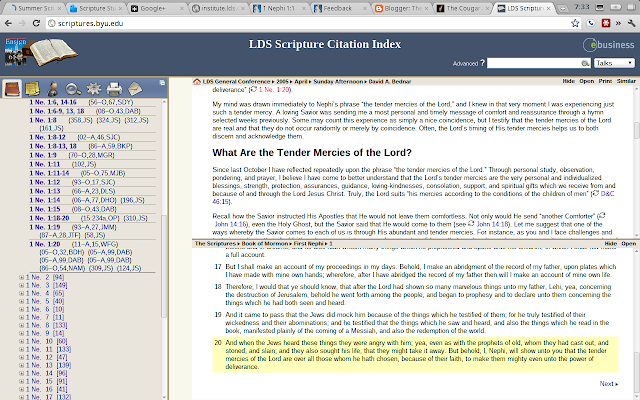
How many times has 1 Nephi 1:20 been quoted, by whom, and what did he/she have to say about it?
The LDS Scripture Citation Index provides an index of LDS scriptures (the Bible, the Book of Mormon, the Doctrine and Covenants and the Pearl of Great Price).  Ever wonder what a certain verse of scripture means?  Look it up in the index column, on the left, and see how various speakers have expounded it.  I like how professor(?) E. Larsen explains how this works (see 6.).  For example, I love how Elder David A. Bednar expounds the phrase "the tender mercies of the Lord," from 1 Nephi 1:20.  If you missed them, I strongly recommend you read, study, and ponder his remarks, noting especially that those who are "chosen" by Heavenly Father become chosen by choosing Him (through keeping His commandments, etc.), rather than winning some kind of celestial lottery.

2. The Book of Mormon and Other Student Manuals
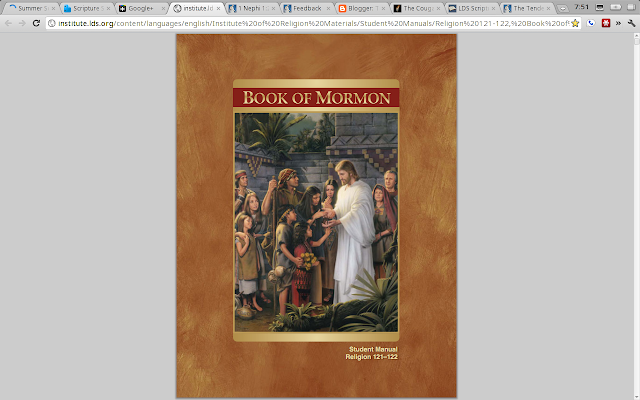
I especially recommend reading the BoM Student Manual in Google Chrome, for fast loading.
Latter-day Saints accept an open cannon of scripture and may, therefore, benefit from the inspiration and insights of modern prophets and apostles.  I love how the Book of Mormon Student Manual compiles many insights and explanations about the different verses I'm studying.  You can access even more manuals, such as for the New Testament, at institute.lds.org/eng/.

3. My Study Notebook from lds.org
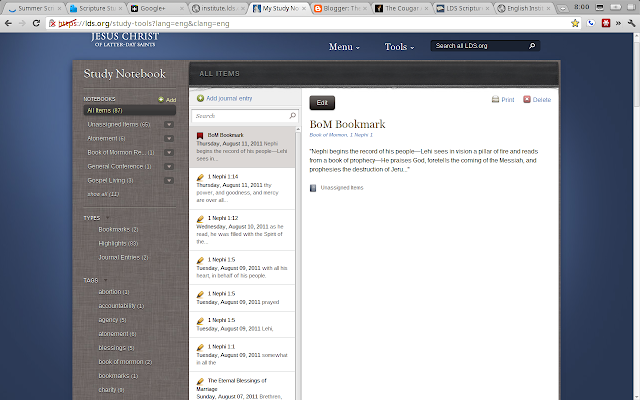
Keep track of your studies with My Study Notebook
I'll avoid going into great detail, here, and simply note what may seem obvious:  My Study Notebook helps readers with an LDS account keep track of their thoughts, highlights, bookmarks, and more.  Whenever you want to study and search the scriptures, I strongly suggest you first go to https://lds.org/study-tools?lang=eng&clang=eng because it will log you into your study notebook home page, enabling you to quickly return to your most recent reading via a bookmark, which I'll discuss next, and ensure you're keeping track of your notes and highlights while studying (otherwise, you'll have to login when you want to annotate, highlight, etc., anyway).

4. Scriptures.lds.org Bookmark Tool for Keeping My Place in My Online Study
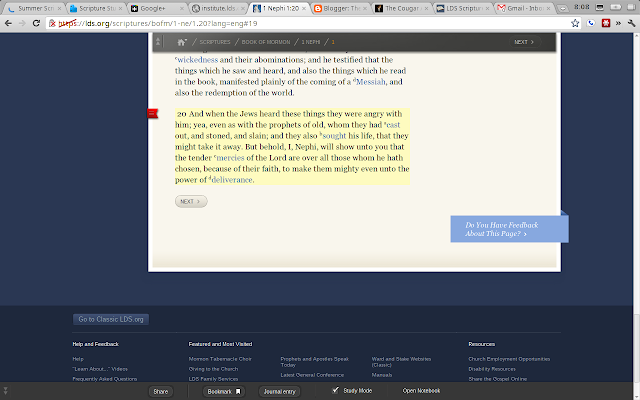
My friendly red bookmark helps me get back to where I left off in my reading.
Now that I'm starting to read the Book of Mormon again, from the beginning, I've decided to jump in and try doing it online at scriptures.lds.org.  I'm still undecided how I feel about reading the scriptures online versus actually touching them, as they're one of the few things I generally read off my computer screen.  With that said, I've come to appreciate the bookmark feature associated with My Study Notebook.  Access it by clicking on the bookmark button in the middle-left section of the bottom toolbar.  For the moment, I believe I can set a bookmark only at the top of the page, even though I though can slide the bookmark up and down.  Maybe it's because I'm on the development channel for both Google Chrome and Chrome OS.

That's all for today!  Please share your own thoughts and suggestions in the comments section or on my plus post: https://plus.google.com/u/1/110524638589641892271/posts/gGDz8nCSwGP

Will you also please let me know what questions you have about anything you read in today's post?

Happy studying!!