In an age where "anything goes" and, so many "call evil good" (Isaiah 5:20), I'm delighted to see six young people stand up and declare that they can control their sexual appetites and that they are happy because of that decision.
There hath no temptation taken you but such as is common to man: but God is faithful, who will not suffer you to be tempted above that ye are able; but will with the temptation also make a way to escape, that ye may be able to bear it (1 Corinthians 10:13).
Sunday, July 24, 2011

Sunday, July 17, 2011
Today's Spiritual Message: T-I-M-E Spells Love
Sometimes I struggle to remember one of the greatest gifts I can give my family is my time. How often do we like to feel busy and important? Yet, what could be more important than spending time with our family? I love what President Dieter F. Uchtdorf said last October General Conference, “In family relationships love is really spelled t-i-m-e, time.”
"Let’s be honest; it’s rather easy to be busy. We all can think up a list of tasks that will overwhelm our schedules. Some might even think that their self-worth depends on the length of their to-do list. They flood the open spaces in their time with lists of meetings and minutia—even during times of stress and fatigue. Because they unnecessarily complicate their lives, they often feel increased frustration, diminished joy, and too little sense of meaning in their lives."
I invite you to read President Uchtdorf's message, "Of Things That Matter Most," along with a message from this month's Ensign (the official magazine of the Church of Jesus Christ of Latter-day Saints), "T-I-M-E Spells Love."
 |
| What do we make our priorities? |
 |
| President Dieter F. Uchtdorf |
Friday, July 15, 2011
Google Talk Launch App(?) and New Window Switcher on Chrome OS 14.0.751.0
Update: Upon further discovery, it turns out the []]] button (next to the full-screen button) has been transformed from a window switcher (alt+tab) to a window maximizer (alt+spacebar+x on Windows).
Okay, as I've said, recently, I usually let these kind of posts go because someone's generally already covered them. Maybe I've failed to see anything on this one (yet) because it's late on a Friday night . . . Such is my geekdom.
When I saw on Jee Lee's blog feed that there was finally a new, 14.0 Chrome OS build, I had to try it out and test the waters.
Sure enough, I got what I wanted: At least two new morsels.
1. Google Talk Launch App(?)
So far as I can tell, all this "new" app does is add another button, with the word "Launch," which does what the previous Talk app already did . . . Someone want to let me in on the secret?
2. New Window Switcher Icon and Functionality: Multiple (Side-Side) Windows with New Keyboard Shortcuts, along with Extended Click for Window Switcher Icon
That's right, folks, the Chrome team appears to have ditched the old window switcher icon in favor of what I consider a more svelte and attractive option. To be candid, I just figured out it's functionality, so sit down for this one: When the top-right icon has multiple windows, this means that clicking it will show me my other window(s), behind my current window. Next, when the icon is solid, clicking it will maximize my current window, covering up the other one.
The Chrome team also (kind of) added some functionality I'd been hankering for, for a long time: The ability to flick my mouse to the top-right of the screen, click, and have the window change back and forth. What the Chrome team produced is actually different from what I was expecting -- the new icon switches between maximized and full-screen view, rather than flipping between windows. I'm confident this new development will really please people who want to see multiple windows at once, and I can always use the alt+tab combo to get between various windows. Something I'm a little bummed about is that if I want to just maximize a window, rather than making it totally full screen, I think I have to click the window switcher icon, which I dislike because it's a lot more time consuming to target than to simply flick my mouse to the corner or press alt+tab. So, in other words, if I'm seeing things correctly, there is no keyboard shortcut to maximize a partially opened window. :( Ah, well. I suppose I have a hard time getting everything I want in a new release . . . ACTUALLY, upon snooping around a little, while Chrome decided if Blogger was going to crash or recover, I discovered a keyboard shortcut to re-size windows: alt+. and alt+, Going all the way with alt+. is equivalent to maximizing the screen, although slower than one keystroke or single combination. As I said, it can be hard to get everything we (geeks) want. I do generally appreciate a friendly work-around, though, so thanks Chrome team. :)
What else have you guys noticed in the 14.0 build?
P.S. I seem to have my ctrl+(window switcher icon) screenshots showing up outside my screenshots folder in my File Shelf folder . . .
Okay, as I've said, recently, I usually let these kind of posts go because someone's generally already covered them. Maybe I've failed to see anything on this one (yet) because it's late on a Friday night . . . Such is my geekdom.
When I saw on Jee Lee's blog feed that there was finally a new, 14.0 Chrome OS build, I had to try it out and test the waters.
Sure enough, I got what I wanted: At least two new morsels.
1. Google Talk Launch App(?)
 |
| A Second Google Talk App?? |
2. New Window Switcher Icon and Functionality: Multiple (Side-Side) Windows with New Keyboard Shortcuts, along with Extended Click for Window Switcher Icon
 |
| A new icon, double windows, and more clickable space, oh my! |
The Chrome team also (kind of) added some functionality I'd been hankering for, for a long time: The ability to flick my mouse to the top-right of the screen, click, and have the window change back and forth. What the Chrome team produced is actually different from what I was expecting -- the new icon switches between maximized and full-screen view, rather than flipping between windows. I'm confident this new development will really please people who want to see multiple windows at once, and I can always use the alt+tab combo to get between various windows. Something I'm a little bummed about is that if I want to just maximize a window, rather than making it totally full screen, I think I have to click the window switcher icon, which I dislike because it's a lot more time consuming to target than to simply flick my mouse to the corner or press alt+tab. So, in other words, if I'm seeing things correctly, there is no keyboard shortcut to maximize a partially opened window. :( Ah, well. I suppose I have a hard time getting everything I want in a new release . . . ACTUALLY, upon snooping around a little, while Chrome decided if Blogger was going to crash or recover, I discovered a keyboard shortcut to re-size windows: alt+. and alt+, Going all the way with alt+. is equivalent to maximizing the screen, although slower than one keystroke or single combination. As I said, it can be hard to get everything we (geeks) want. I do generally appreciate a friendly work-around, though, so thanks Chrome team. :)
What else have you guys noticed in the 14.0 build?
P.S. I seem to have my ctrl+(window switcher icon) screenshots showing up outside my screenshots folder in my File Shelf folder . . .
Tuesday, July 12, 2011
Acer Wifi Chromebook Arrives (Finally)
Well, chromebook aficionados, it looks like Acer's wifi-only chromebook has finally arrived (just under a month after it was scheduled to join the party) and it comes in at $80 less than Samsung's wifi-only model, or a round $350.
Here are the specs of both available chromebooks, from Google.
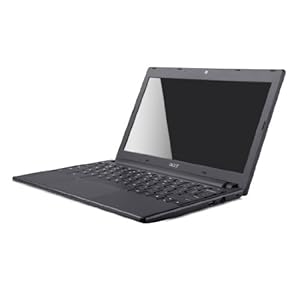
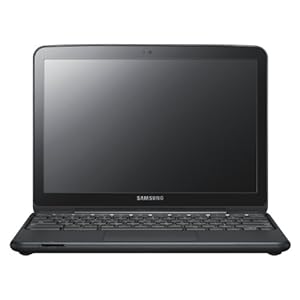
The Cromia, as it's called, is a tad lighter than the Samsung Series 5 (2.95lbs v. 3.26), has a slightly smaller screen size (11.6" v. 12.1"), runs out of battery about 30% faster (6 hours v. 8.5), and is, some complain, less stylish. Here is the Cromia on the left, with the Series 5 to the right.
Moreover, some believe the Series 5 has a better keyboard, which we'll actually find out, after we get some real hands-on reviews.
Finally, I believe the Cromia has a higher screen resolution and supports HDMI output, rather than the Series 5's VGA.
Cromia v. Series 5
My principal questions for comparison would be how much smaller do the screen and keyboard feel, and is there any difference in performance? If any of these three factors is significantly poorer on the Cromia, I think I'd very well lean toward the Series 5.
Further on performance, the processor/RAM specs are, to my knowledge, identical.
Also, while the Series 5 battery life is notably better, I'm almost always right next to a power outlet, anyway, so that and other features, like a tiny difference in weight and video output, would hardly impact my personal decision.
In the final analysis, maybe the biggest difference between the two is the $80 (or about 18.5%) discount the Cromia offers over the Series 5(?).
What do you think? Will you buy one over the other, or either one, at all? Why?
Please sound off in the comments section or chime in on my Google+ post.
I first saw this announcement on Dinu's Chromestory. Thanks for the news, Dinu!
(Updated at 12:21pm eastern, changing the Cromia weight, based on this eWeek article.)
Here are the specs of both available chromebooks, from Google.
The Cromia, as it's called, is a tad lighter than the Samsung Series 5 (2.95lbs v. 3.26), has a slightly smaller screen size (11.6" v. 12.1"), runs out of battery about 30% faster (6 hours v. 8.5), and is, some complain, less stylish. Here is the Cromia on the left, with the Series 5 to the right.
Moreover, some believe the Series 5 has a better keyboard, which we'll actually find out, after we get some real hands-on reviews.
Finally, I believe the Cromia has a higher screen resolution and supports HDMI output, rather than the Series 5's VGA.
Cromia v. Series 5
My principal questions for comparison would be how much smaller do the screen and keyboard feel, and is there any difference in performance? If any of these three factors is significantly poorer on the Cromia, I think I'd very well lean toward the Series 5.
Further on performance, the processor/RAM specs are, to my knowledge, identical.
Also, while the Series 5 battery life is notably better, I'm almost always right next to a power outlet, anyway, so that and other features, like a tiny difference in weight and video output, would hardly impact my personal decision.
In the final analysis, maybe the biggest difference between the two is the $80 (or about 18.5%) discount the Cromia offers over the Series 5(?).
What do you think? Will you buy one over the other, or either one, at all? Why?
Please sound off in the comments section or chime in on my Google+ post.
I first saw this announcement on Dinu's Chromestory. Thanks for the news, Dinu!
(Updated at 12:21pm eastern, changing the Cromia weight, based on this eWeek article.)
Sunday, July 10, 2011
Today's Spiritual Message: Watch Your Step
In today's world, so many of us want to justify our actions by saying, "It doesn't hurt anyone else." I suggest we take a step back and ponder how accurate that defense really is, if ever.
Does any one of us live in a vacuum? Who can doubt the verity that our actions affect others, our children, future generations, and the world. Ever heard of the butterfly effect?
Does any one of us live in a vacuum? Who can doubt the verity that our actions affect others, our children, future generations, and the world. Ever heard of the butterfly effect?
Friday, July 8, 2011
Blogger Gets a Facelift!
Just as I'm about to send this news to Alex Chitu and others, I see Alex already knows about it. Sheesh!
I suggest you check out Alex's review for a detailed look.
For now, I mainly really like how clean and newfangled (futuristic) it looks. I'm sure I'll develop a deeper opinion, soon. [After writing this, I also learned I can, finally, edit photos in Blogger. Too bad Picnik's crazy slow (for me, anyway) and lacks a lot of common features that free screenshot tools have, like blur.]
As another tip (I'm in a tipping mood), if you hate having your blog load on your slow machine (hey, my Cr-48's got a pretty cheap processor) and you just want to get straight to a new post, open the New Post link and then bookmark it, and use the bookmark whenever you want to quickly get to a new post, bypassing your full, published blog.
What do you guys think?
 |
| New post editor. |
 |
| New Interface |
For now, I mainly really like how clean and newfangled (futuristic) it looks. I'm sure I'll develop a deeper opinion, soon. [After writing this, I also learned I can, finally, edit photos in Blogger. Too bad Picnik's crazy slow (for me, anyway) and lacks a lot of common features that free screenshot tools have, like blur.]
As another tip (I'm in a tipping mood), if you hate having your blog load on your slow machine (hey, my Cr-48's got a pretty cheap processor) and you just want to get straight to a new post, open the New Post link and then bookmark it, and use the bookmark whenever you want to quickly get to a new post, bypassing your full, published blog.
What do you guys think?
How to Ctrl+End on a Chromebook
If you're like me, you live off keyboard shortcuts. Also, if you're like me, you have a Cr-48 or other chromebook and have been irked that they lack a true way to get to the begging/end of a document, which can normally be done using ctrl+end/home. The Chrome OS team knows about the issue and is working on it.
This morning, I stumbled upon a workaround: Just press shift and click on the bottom/top of the scroll bar.
That's it! I hope this tip helps those of you (if any?) who have been agonizing over this on your chromebook.
 |
| Many of my docs are a lot longer than four words . . . |
That's it! I hope this tip helps those of you (if any?) who have been agonizing over this on your chromebook.
Wednesday, July 6, 2011
Chrome OS Stable on Cr-48 Has Arrived(?)
FINAL UPDATE; Okay, I tried the stable build for like five minutes, yesterday, got annoyed with how slow Pandora made my Cr-48, coupled with the fact that both Chrome OS flash plugins failed to work with Google Music (ironic, for the stable build?), and I disliked how slow the build felt, in general. Maybe these are some of the reasons why the 12.0.433.231 "stable" build is missing from cros-omahaproxy.appspot.com/.
Update: After downloading a new Chrome OS recovery image, and according to my chrome://settings/about page, I am indeed on the stable channel.
Funny thing is, I'm failing to see the build listed on the http://cros-omahaproxy.appspot.com/ page.
I'm curious to see how this turns out . . .
I mainly want to see if Chrome OS stability = increased speed/performance (while unstable Chrome OS = slow). We'll see. [Original post follows.]
Well, I'm confused on this one, folks.
Supposedly, a stable channel release of Chrome OS on the Cr-48 has been released. From my experience (see my comment at Jay Lee's blog), it may be available only as a system restore image . . .
I'll try again, tomorrow.
Any thoughts?
Update: After downloading a new Chrome OS recovery image, and according to my chrome://settings/about page, I am indeed on the stable channel.
 |
| See where it says "stable-channel x86-Mario" |
 |
| I see a Samsung (Alex) stable channel, but where's the Mario (Cr-48) stable channel listing? |
I mainly want to see if Chrome OS stability = increased speed/performance (while unstable Chrome OS = slow). We'll see. [Original post follows.]
Well, I'm confused on this one, folks.
Supposedly, a stable channel release of Chrome OS on the Cr-48 has been released. From my experience (see my comment at Jay Lee's blog), it may be available only as a system restore image . . .
I'll try again, tomorrow.
Any thoughts?
Want a Google+ Invite? Let Me Know
2d Update: Looks like invites are back on. We'll see how long it lasts. Let me know if you'd like one.
Update: The moment I went to start sending out invites, this image disappeared . . . Either Google's really clamping down on the number of invites it gives out, or Google+ demand is as impressive as some believe. To be candid, I'm more inclined to believe the former. When will + be open to one and all? (I've seen some speculation that it will happen by the end of the month.)
 |
| Taken from my + account . . . |
Sunday, July 3, 2011
Today's Spiritual Message: And This Be Our Motto: "In God Is Our Trust"
Have you ever sang the second and fourth verses of The Star Spangled Banner? I had that privilege at church, today, and really got choked up:
On the shore, dimly seen through the mists of the deep,
Where the foe's haughty host in dread silence reposes,
What is that which the breeze, o'er the towering steep,
As it fitfully blows, half conceals, half discloses?
Now it catches the gleam of the morning's first beam,
In full glory reflected now shines in the stream:
'Tis the star-spangled banner! Oh long may it wave
O'er the land of the free and the home of the brave!
Oh! thus be it ever, when freemen shall stand
Between their loved home and the war's desolation!
Blest with victory and peace, may the heav'n rescued land
Praise the Power that hath made and preserved us a nation.
Then conquer we must, when our cause it is just,
And this be our motto: "In God is our trust."
And the star-spangled banner in triumph shall wave
O'er the land of the free and the home of the brave!
I'm really touched by the second verse's reference to the sacrifice and suffering of our heroes of war who gave their life to gain and protect our freedom. I know a number of brave men who have served our country in war and were also willing to give their lives. I honor them.
I'm also moved to think back to a time when the whole nation stood up together and "Praise[d] the Power that hath made and preserved us a nation." How I wish we would have that same reverence and veneration, today!
 |
| In God is our trust. |
On the shore, dimly seen through the mists of the deep,
Where the foe's haughty host in dread silence reposes,
What is that which the breeze, o'er the towering steep,
As it fitfully blows, half conceals, half discloses?
Now it catches the gleam of the morning's first beam,
In full glory reflected now shines in the stream:
'Tis the star-spangled banner! Oh long may it wave
O'er the land of the free and the home of the brave!
 |
| To me, this photo says it all. |
Oh! thus be it ever, when freemen shall stand
Between their loved home and the war's desolation!
Blest with victory and peace, may the heav'n rescued land
Praise the Power that hath made and preserved us a nation.
Then conquer we must, when our cause it is just,
And this be our motto: "In God is our trust."
And the star-spangled banner in triumph shall wave
O'er the land of the free and the home of the brave!
I'm really touched by the second verse's reference to the sacrifice and suffering of our heroes of war who gave their life to gain and protect our freedom. I know a number of brave men who have served our country in war and were also willing to give their lives. I honor them.
I'm also moved to think back to a time when the whole nation stood up together and "Praise[d] the Power that hath made and preserved us a nation." How I wish we would have that same reverence and veneration, today!
Behold, this is a choice land, and whatsoever nation shall possess it shall be free from bondage, and from captivity, and from all other nations under heaven, if they will but serve the God of the land, who is Jesus Christ, who hath been manifested by the things which we have written.Ether 12: 2. I hope and pray that we will, as a nation, return to praising the Power that hath made and preserved us a nation.
 |
| Many of our forebears crossed the Atlantic in an outright trust and general dependence on God. How much can the same be said about this nation, today? |
While the storm clouds gather far across the sea,
Let us swear allegiance to a land that's free,
Let us all be grateful for a land so fair,
As we raise our voices in a solemn prayer.
God bless America,
Land that I love.
Stand beside her, and guide her
Through the night with a light from above.
From the mountains, to the prairies,
To the oceans, white with foam
God bless America, My home sweet home
God bless America, My home sweet home.
Friday, July 1, 2011
A Couple Chrome Tips: Open Multiple Bookmarks and Select Multiple Tabs
First of all, I imagine someone like Alex, Dinu, Daniel, or Nigel has already posted on these tips. With that said, the other day, while I was reading my morning scriptures, I came across a few tricks I had either forgotten, never realized, or simply never read about:
Open multiple bookmarks. Just about every morning, I have three pages I want to open up, and I can get annoyed with having to find the URLs or even with clicking on them in my most visited section. For some reason, I had it finally click in for me that I could simply bookmark the three pages and then, perhaps, open them all at once. It's possible. Here's how.
1. First of all, save your three bookmarks (or however many) into one folder.
2. Next, either place that folder on the bookmarks bar or find it via the "Other bookmarks" folder.
3. Finally, right click the folder and then choose whether to open all of them in the current window, a new window, or an incognito window.
For some reason, opening the bookmarks in the same window leaves the current tab in its current state, in addition to the newly minted tabs. E.g., if I open the three bookmarks from my specified folder from the new tab page, I'll now have four tabs: My three bookmarks, along with the new tab page (still open). I suppose it is a struggle to try and win 'em all . . .
Select multiple tabs. I'm unsure why I thought to try this one. Sometimes, you might want to close/move/etc. multiple tabs that are not adjacent to one another. Well, we can achieve this dearest wish of our heart by simply pressing the ctrl key, while clicking on the targeted tabs. That's it. Now we can move them wherever we want (within boundaries, of course, people, be reasonable), close them, pin them, etc. Pretty straightforward.
As the emperor in Amadeus would say, "Well, there i'tis." Translation: That's it.
Open multiple bookmarks. Just about every morning, I have three pages I want to open up, and I can get annoyed with having to find the URLs or even with clicking on them in my most visited section. For some reason, I had it finally click in for me that I could simply bookmark the three pages and then, perhaps, open them all at once. It's possible. Here's how.
 |
| I'd show you the right-click action with its accompanying menu . . . alas, Chrome OS forbids me. Nooooo!! the naysayers were right, it can't do everything!!! |
2. Next, either place that folder on the bookmarks bar or find it via the "Other bookmarks" folder.
3. Finally, right click the folder and then choose whether to open all of them in the current window, a new window, or an incognito window.
For some reason, opening the bookmarks in the same window leaves the current tab in its current state, in addition to the newly minted tabs. E.g., if I open the three bookmarks from my specified folder from the new tab page, I'll now have four tabs: My three bookmarks, along with the new tab page (still open). I suppose it is a struggle to try and win 'em all . . .
Select multiple tabs. I'm unsure why I thought to try this one. Sometimes, you might want to close/move/etc. multiple tabs that are not adjacent to one another. Well, we can achieve this dearest wish of our heart by simply pressing the ctrl key, while clicking on the targeted tabs. That's it. Now we can move them wherever we want (within boundaries, of course, people, be reasonable), close them, pin them, etc. Pretty straightforward.
 |
| Can you see how the three top-right tabs are selected? |
"And now," as Dumbledore would likely declare, "it really is time for bed."
Sunday, June 26, 2011
Wednesday, June 22, 2011
HAPPY 450th POST!!! Picasa Icon Viewing Tip
Yes, CA faithful, it's time for a long-lost computing tip from the CA.

Do you use Picasa as your default picture viewer? Well, I do. This has nice little benefits like a fun slideshow effect, when viewing images from my file folder. What's the downside I've grumbled to myself about for the past few years? Image icons are displayed as a flippin brown hill with trees on it!!
Finally, the other day, I put my grumbling to rest and got out my search hat. Ironically enough, I found the answer in about 10 seconds.
So here's the low down on how to fix this annoyance on a Windows machine:
Open your folder window and click on Tools>Folder options (as shown below)

Next, click on the view tab, as follows: View>Always show icons, never thumbnails

You'll want to make sure the "Always show icons, never thumbnails box is unchecked (as shown below)

Finally, choose your image size (small, medium, large, JUMBO-large, etc.):


VOILA!! Now, I can finally see what picture "IMG_2948" actually is, absent opening it up in Picasa.
For those of you who ever upload screenshots (or, frankly, any pictures at all), I imagine you'll really enjoy this change, if you're a Picasa user who's been agonizing over this wonkiness.
Please hit me with any questions or comments in the, well, comments section.
Do you use Picasa as your default picture viewer? Well, I do. This has nice little benefits like a fun slideshow effect, when viewing images from my file folder. What's the downside I've grumbled to myself about for the past few years? Image icons are displayed as a flippin brown hill with trees on it!!
 |
| Seriously, what's with the hill/trees graphic (rather than an actual preview of the images)? |
So here's the low down on how to fix this annoyance on a Windows machine:
Open your folder window and click on Tools>Folder options (as shown below)

Next, click on the view tab, as follows: View>Always show icons, never thumbnails

You'll want to make sure the "Always show icons, never thumbnails box is unchecked (as shown below)

Finally, choose your image size (small, medium, large, JUMBO-large, etc.):
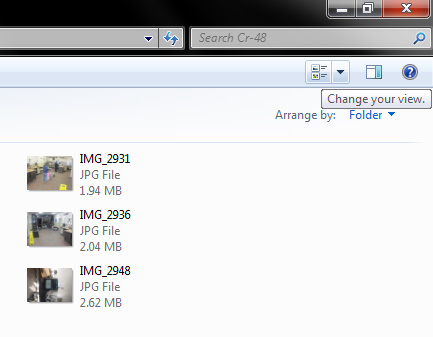
I recommend large or extra large, especially if the folder is a pictures folder (you can always change the display size, whenever you want)

 |
| Ah, now visible memories. |
Please hit me with any questions or comments in the, well, comments section.
Sunday, June 19, 2011
Today's Spiritual Message: Father's Day
This Father's Day, I want to share the lyrics to one of my favorite hymns:
O my Father, thou that dwellest
In the high and glorious place,
When shall I regain thy presence
And again behold thy face?
In thy holy habitation,
Did my spirit once reside?
In my first primeval childhood
Was I nurtured near thy side?
For a wise and glorious purpose
Thou hast placed me here on earth
And withheld the recollection
Of my former friends and birth;
Yet ofttimes a secret something
Whispered, "You're a stranger here,"
And I felt that I had wandered
From a more exalted sphere.
I had learned to call thee Father,
Thru thy Spirit from on high,
But, until the key of knowledge
Was restored, I knew not why.
In the heav'ns are parents single?
No, the thought makes reason stare!
Truth is reason; truth eternal
Tells me I've a mother there.
When I leave this frail existence,
When I lay this mortal by,
Father, Mother, may I meet you
In your royal courts on high?
Then, at length, when I've completed
All you sent me forth to do,
With your mutual approbation
Let me come and dwell with you.
(O My Father, LDS Hymn #292.)
Often, I feel like we've lost an appreciation for God, at all, let alone as our literal Father. Today, I want to testify that we are, as Paul said, His "offspring" (Acts 17:29), His children. I witness that His greatest achievement lies not in the creation of earths, universes, or cosmoses, but in aiding our progression to become as He is:
O my Father, thou that dwellest
In the high and glorious place,
When shall I regain thy presence
And again behold thy face?
In thy holy habitation,
Did my spirit once reside?
In my first primeval childhood
Was I nurtured near thy side?
For a wise and glorious purpose
Thou hast placed me here on earth
And withheld the recollection
Of my former friends and birth;
Yet ofttimes a secret something
Whispered, "You're a stranger here,"
And I felt that I had wandered
From a more exalted sphere.
I had learned to call thee Father,
Thru thy Spirit from on high,
But, until the key of knowledge
Was restored, I knew not why.
In the heav'ns are parents single?
No, the thought makes reason stare!
Truth is reason; truth eternal
Tells me I've a mother there.
When I leave this frail existence,
When I lay this mortal by,
Father, Mother, may I meet you
In your royal courts on high?
Then, at length, when I've completed
All you sent me forth to do,
With your mutual approbation
Let me come and dwell with you.
(O My Father, LDS Hymn #292.)
Often, I feel like we've lost an appreciation for God, at all, let alone as our literal Father. Today, I want to testify that we are, as Paul said, His "offspring" (Acts 17:29), His children. I witness that His greatest achievement lies not in the creation of earths, universes, or cosmoses, but in aiding our progression to become as He is:
For behold, this is my work and my glory -- to bring to pass the immortality and eternal life of man (Moses 1:39).Thus, like our Father-in-heaven, my greatest joy, here on earth (and next to being married to my wife) is to raise and love my sweet daughter and other future children, in some tiny degree, as He loves and raises you, me, and all of us.
Saturday, June 18, 2011
Will You Wii U? Some Hardcores Might, I Probably Won't
First of all, let me say this could be one of the only "by-request" posts I've ever done, especially outside the wife-requested genre.
Next, let me disclose that the F-Word will likely chafe at anything I have to say in this post, as he revoked my video game man card many moons ago. Rest assured, my head is still hanging in shame.
Now, to the subject at hand: The Wii U. Announced to hit the masses next year, the Wii's successor will arrive roughly six years after the original wooed the non-gaming public back in 2006.

While I'm in disclosure mode, let me also confess that the extent of my knowledge on the Wii U extends basically to its Wikipedia page (that heavenly haven of all knowledge) and maybe one half an article from a usually computer tech site (I think it was CNET).
My gut reaction on this one is that Nintendo's aiming to chip away at (or destroy) its casual/child gamer image. While many have long caricatured the Nintendo gaming experience as built for children (Mario, Zelda, etc., seem much more child friendly than Grand Theft Auto, Halo, or Resident Evil), the Wii magnified this pronouncement to the nth degree: Nintendo marketed, and people accepted, the Wii as the we device -- which is to say everyone can and will want to play it, rather than just the 30-something vampires, existing in their parents'/grandparents' basement. While my general observation is that a lot of people enjoy playing the Wii, I imagine most of the casual Wii gamers were, and are, well, casual. Nintendo, like MS, Sony, or any game company, is in it to win it, which is to say, make $. Let's do the familiar Parreto analysis: If just 20% of our customers actually buy 80% of our games (in terms of count sold), we just might want to please that lot most. So who is this mythical 20%? The hardcores (maligned above as parasitic vampires).
How does Nintendo lure back the hardcores?
What have hardcore gamers been screaming for ever since the Xbox and PlayStation 2 emerged from the labs? To my knowledge, hardcore graphics, hardcore games, and hardcore everything. Yes, I'm amused with how vague that proclamation sounds, myself. On the other hand, I think it fits the mold of escaping the Wii's casual (non-hardcore) image.
HARDCORE: Just looking at the machine (the Wii U), I think to myself: Is this an Xbox 360 in Nintendo's clothing? Will the new Jumbo-large controller play Halo 3000, in addition to Mario and Zelda? With HD rendering and a newfangled controller, I assume Nintendo's gunning hardcore to get its core users back, who are always the hardcores (or lure some away from MS and Sony).
FAMILIAR: As I heard about the new name, I asked myself, "Wii U"? Based on what I've seen, my assumption is that Nintendo's trying to toe the line of keeping the "casual" gamers in tow ("Seriously, folks, it's still a console grandma and grandpa can enjoy, it's still a Wii!"), while tantalizing the hardcore. Nintendo appears to have some success in store from the casual, thanks to its Wii-backward compatibility. On the other hand, why just back to the Wii, rather than the Cube, as well? Maybe the assumption here is that too few casual gamers have Cube memorabilia and too few hardcores would care enough to play Cube games, anyway.
SUCCESS? While I'll leave a detailed analysis of the Wii U's detailed specs and chances at financial success, I'll give it a moderate shot of winning back (or gaining) some of the hardcore gamers, while likely keeping on board any casual gamers who actually care enough to plunk down the $ for another system. I think much will depend on the $ tag and how the iPad, er, new controller sits with the masses.
PERSONAL REACTION: While I've long been a Nintendo "fanboy," I've also long since been dead to video game counsels and, pretty much, gaming in general. I imagine my current personal preference is demonstrated by the image at the top of this blog, along with its (the blog's) regular content. So what's my BOLD, F-WORD STYLE PREDICTION? THIS IS THE LAST REASONABLY SUCCESSFUL CONSOLE GENERATION AND ALL PREDECESSORS WILL RUN OUT OF THE CLOUD. See this article on how cloud computing is starting to throttle the console market, thanks to higher internet speeds, enhanced capability via HTML5, etc., and which more or less summarizes my newspaper-destiny forecast of the console market.
I hope you enjoyed this CA production. Please vent any outrage or smug agreement in the comments section, below. Thanks.
Next, let me disclose that the F-Word will likely chafe at anything I have to say in this post, as he revoked my video game man card many moons ago. Rest assured, my head is still hanging in shame.
Now, to the subject at hand: The Wii U. Announced to hit the masses next year, the Wii's successor will arrive roughly six years after the original wooed the non-gaming public back in 2006.
 |
| Sorry, I failed to find a cool shot of the Wii U stacked on top of its predecessors. On second thought, I'm unsure the ancestors would have the bulk to support it . . . |
While I'm in disclosure mode, let me also confess that the extent of my knowledge on the Wii U extends basically to its Wikipedia page (that heavenly haven of all knowledge) and maybe one half an article from a usually computer tech site (I think it was CNET).
 |
| How large do the casual gamers loom? |
How does Nintendo lure back the hardcores?
What have hardcore gamers been screaming for ever since the Xbox and PlayStation 2 emerged from the labs? To my knowledge, hardcore graphics, hardcore games, and hardcore everything. Yes, I'm amused with how vague that proclamation sounds, myself. On the other hand, I think it fits the mold of escaping the Wii's casual (non-hardcore) image.
 |
| Get it, hardcore? Thanks, Wikipedia! |
FAMILIAR: As I heard about the new name, I asked myself, "Wii U"? Based on what I've seen, my assumption is that Nintendo's trying to toe the line of keeping the "casual" gamers in tow ("Seriously, folks, it's still a console grandma and grandpa can enjoy, it's still a Wii!"), while tantalizing the hardcore. Nintendo appears to have some success in store from the casual, thanks to its Wii-backward compatibility. On the other hand, why just back to the Wii, rather than the Cube, as well? Maybe the assumption here is that too few casual gamers have Cube memorabilia and too few hardcores would care enough to play Cube games, anyway.
SUCCESS? While I'll leave a detailed analysis of the Wii U's detailed specs and chances at financial success, I'll give it a moderate shot of winning back (or gaining) some of the hardcore gamers, while likely keeping on board any casual gamers who actually care enough to plunk down the $ for another system. I think much will depend on the $ tag and how the iPad, er, new controller sits with the masses.
PERSONAL REACTION: While I've long been a Nintendo "fanboy," I've also long since been dead to video game counsels and, pretty much, gaming in general. I imagine my current personal preference is demonstrated by the image at the top of this blog, along with its (the blog's) regular content. So what's my BOLD, F-WORD STYLE PREDICTION? THIS IS THE LAST REASONABLY SUCCESSFUL CONSOLE GENERATION AND ALL PREDECESSORS WILL RUN OUT OF THE CLOUD. See this article on how cloud computing is starting to throttle the console market, thanks to higher internet speeds, enhanced capability via HTML5, etc., and which more or less summarizes my newspaper-destiny forecast of the console market.
 |
| The future of gaming. |
Tuesday, June 14, 2011
Google Instant Pages on Chrome
If you think Google Instant is cool, check this out:
Other than the President Obama homage, I'm pretty darn impressed.
Other than the President Obama homage, I'm pretty darn impressed.
Sunday, June 12, 2011
Today's Spiritual Message: Honesty: You Better Believe It!
We live in a world that increasingly turns a blind eye to lying, cheating, and deception. Sometimes our deception may go unnoticed by others. On the other had, we know what we have done, and God knows what we have done. If we tell ourselves otherwise, we're deceiving only ourselves.
Tuesday, June 7, 2011
Apple Introduces iCloud, Sues Whole World for Rights to the Word "Cloud"
Okay, I'm writing this one as a favor to my Apple enthusiast friend who is a borderline Chrome OS convert.
First of all, let's disclose the obvious that I have adopted Steve Ballmer's "All in for the cloud" mantra and am virtually a paid Google employee. Phew. With that off my chest, I will continue.
Mr. Jobs (to avoid contention, I'll refrain from using my favorite nick name for him) and company have released a new way to cut the USB/Firewire cords and still sync data across different devices. What's new? Rather than manually storing all my data on all my Apple branded products, I can now entrust all my data to Apple's online iCloud service, which will sync the data to my different devices for me. Pretty cool. What's the same? Yes, you guessed I would say it: "walled garden." If I want to sync my data across different devices, I'd better be wearing a turtleneck and jeans (sorry, I gave in to the temptation!). In other words, I have to own an automagical Apple product, or I'm hosed.
As I commented on Chrome OS Site, I see this move as Apple essentially doing what Microsoft does best: Tying users to its own products and services, except for Apple takes the magic one step further, decreeing that users must use its infallible products, or die (okay, just lose access to their data).
I'm glad to see things moving more and more toward the cloud -- wait, am I allowed to use that word, now? -- and my preference is for users to take their data where they want, when they want it (which many will argue Google fails at because ubiquitous internet has yet to arrive).
For those who chafe at using Chrome OS because, GASP, it stores everything in the cloud! how is iCloud any different? In a lot of ways, I welcome Apple's pretended venture into the clouds (I say pretended because where do I access my data? I presume on locally-installed programs, er, apps) because more and more people will realize that trusting our data to third parties (again, GASP) is inevitable.
I have a dream that one day my children and grandchildren will be able to access their data and apps wherever they go and on any machine, not because of the products they own, but because they will have universal access to it across any device.
I will hand it to Apple and assume this service will appease many fans, while allowing it to somewhat dip a toe into cloud computing. On the other hand, I feel like Apple and Microsoft will eventually lose substantial ground to companies like Google, Facebook, and Amazon, because the former two insist on maintaining their tired (did you like that snark?) and true business models.
In the early 2000s, Apple broke out of its customary PC/laptop shell and opened up to all things iPortable. Is iCloud the beginning of Apple's transition to cloud computing? I doubt it, but time will tell.
For more, Google iCloud. ;) Or, you could simply read what I consider an even-handed article from CNET.
You may now shower me with boos, hisses, weeping, wailing, and gnashing of teeth. I have only one request: Do it in the comments section, for all to see. }:-)
First of all, let's disclose the obvious that I have adopted Steve Ballmer's "All in for the cloud" mantra and am virtually a paid Google employee. Phew. With that off my chest, I will continue.
 |
| Is that the Soundcloud logo in silver!! Someone file suit, quick! |
As I commented on Chrome OS Site, I see this move as Apple essentially doing what Microsoft does best: Tying users to its own products and services, except for Apple takes the magic one step further, decreeing that users must use its infallible products, or die (okay, just lose access to their data).
I'm glad to see things moving more and more toward the cloud -- wait, am I allowed to use that word, now? -- and my preference is for users to take their data where they want, when they want it (which many will argue Google fails at because ubiquitous internet has yet to arrive).
For those who chafe at using Chrome OS because, GASP, it stores everything in the cloud! how is iCloud any different? In a lot of ways, I welcome Apple's pretended venture into the clouds (I say pretended because where do I access my data? I presume on locally-installed programs, er, apps) because more and more people will realize that trusting our data to third parties (again, GASP) is inevitable.
 |
| 0 visible dollars (the cost is built into the products/services) does seem a lot better than MobileMe's $99 price tag. |
Yes, iCloud may be free to those willing to don a turtleneck and jeans, day in and day out. For those who want to slip into something else (use a non-Apple product), iCloud is, as I understand it, the antithesis of free.
I will hand it to Apple and assume this service will appease many fans, while allowing it to somewhat dip a toe into cloud computing. On the other hand, I feel like Apple and Microsoft will eventually lose substantial ground to companies like Google, Facebook, and Amazon, because the former two insist on maintaining their tired (did you like that snark?) and true business models.
In the early 2000s, Apple broke out of its customary PC/laptop shell and opened up to all things iPortable. Is iCloud the beginning of Apple's transition to cloud computing? I doubt it, but time will tell.
For more, Google iCloud. ;) Or, you could simply read what I consider an even-handed article from CNET.
You may now shower me with boos, hisses, weeping, wailing, and gnashing of teeth. I have only one request: Do it in the comments section, for all to see. }:-)
Sunday, June 5, 2011
Today's Spiritual Message: Teaching Youth about Chastity
Now that my wife's keyboard is officially fixed, I will leave you with a brief message about how the Church of Jesus Christ of Latter-day Saints teaches its youth about chastity.
Youth are encouraged to regularly review and live the values taught in the For the Strength of Youth pamphlet (the link includes many more resources than just the pamphlet).
We live in a world "that call[s] evil good, and good evil; that put[s] darkness for dlight, and light for darkness; that put[s] bitter for sweet, and sweet for bitter!" (Isaiah 5:20). As such, I am very grateful to have reminders about what really is good, especially when the world seems to have changed its mind. (For example, things like sexting and outright promiscuity are now seen as "good" and healthy, when previously they were thought of as "evil" and "bitter.")
Youth are encouraged to regularly review and live the values taught in the For the Strength of Youth pamphlet (the link includes many more resources than just the pamphlet).
We live in a world "that call[s] evil good, and good evil; that put[s] darkness for dlight, and light for darkness; that put[s] bitter for sweet, and sweet for bitter!" (Isaiah 5:20). As such, I am very grateful to have reminders about what really is good, especially when the world seems to have changed its mind. (For example, things like sexting and outright promiscuity are now seen as "good" and healthy, when previously they were thought of as "evil" and "bitter.")
Wednesday, June 1, 2011
The +1 Button Is Here! Spread the Love . . .
Can you see it, below, in the footer of this post, next to the Gmail, Blogger, Twitter, Facebook, and Buzz share buttons?
Well, it looks like this, except gray:
Here's a fun little video that describes the +1 button's appeal:
Actually, I forced (okay, politely asked) my wife to search for a post I had +1'd, and, sure enough, we saw my +1 recommendation, right in her search results. Very cool, in my view.
If you want to add a +1 button to your own blog posts, as I have, go to the +1 Webmaster site to get the code and then go to Design>Edit HTML on your blog and follow the instructions given on the webmaster site.
I imagine you'll find more simple/understandable instructions by Googling "place +1 blog" or something like that. Happy +1ing and please +1 this post and other CA (my) posts you enjoy. Cheers!
Well, it looks like this, except gray:
 |
| It means you agree/like something |
Actually, I forced (okay, politely asked) my wife to search for a post I had +1'd, and, sure enough, we saw my +1 recommendation, right in her search results. Very cool, in my view.
If you want to add a +1 button to your own blog posts, as I have, go to the +1 Webmaster site to get the code and then go to Design>Edit HTML on your blog and follow the instructions given on the webmaster site.
I imagine you'll find more simple/understandable instructions by Googling "place +1 blog" or something like that. Happy +1ing and please +1 this post and other CA (my) posts you enjoy. Cheers!
Subscribe to:
Posts (Atom)